



Every backlink you earn is a vote of confidence in your content, but those votes can disappear overnight. Pages get deleted, URLs change, editorial links get removed, and brand mentions go uncredited. Link reclamation is the systematic process of recovering lost links.
Traditional link building starts from zero. Link reclamation starts from a relationship that already exists.
Because someone has already decided your brand or content was worth referencing, reclamation outreach is significantly faster, cheaper, and more likely to succeed.
This guide covers every type of link reclamation opportunity, the tools you need to find them, and a step-by-step process to recover lost backlinks and turn unlinked mentions into working links.
Key Takeaways
|
What Is Link Reclamation?
Link reclamation (also called backlink reclamation) is the practice of identifying and recovering backlinks that have been lost, broken, or were never properly credited in the first place. It encompasses three core activities:
- Recovering backlinks that were removed or broken after previously pointing to your site
- Converting unlinked brand mentions into clickable hyperlinks
- Fixing broken or redirected links so they pass full link equity
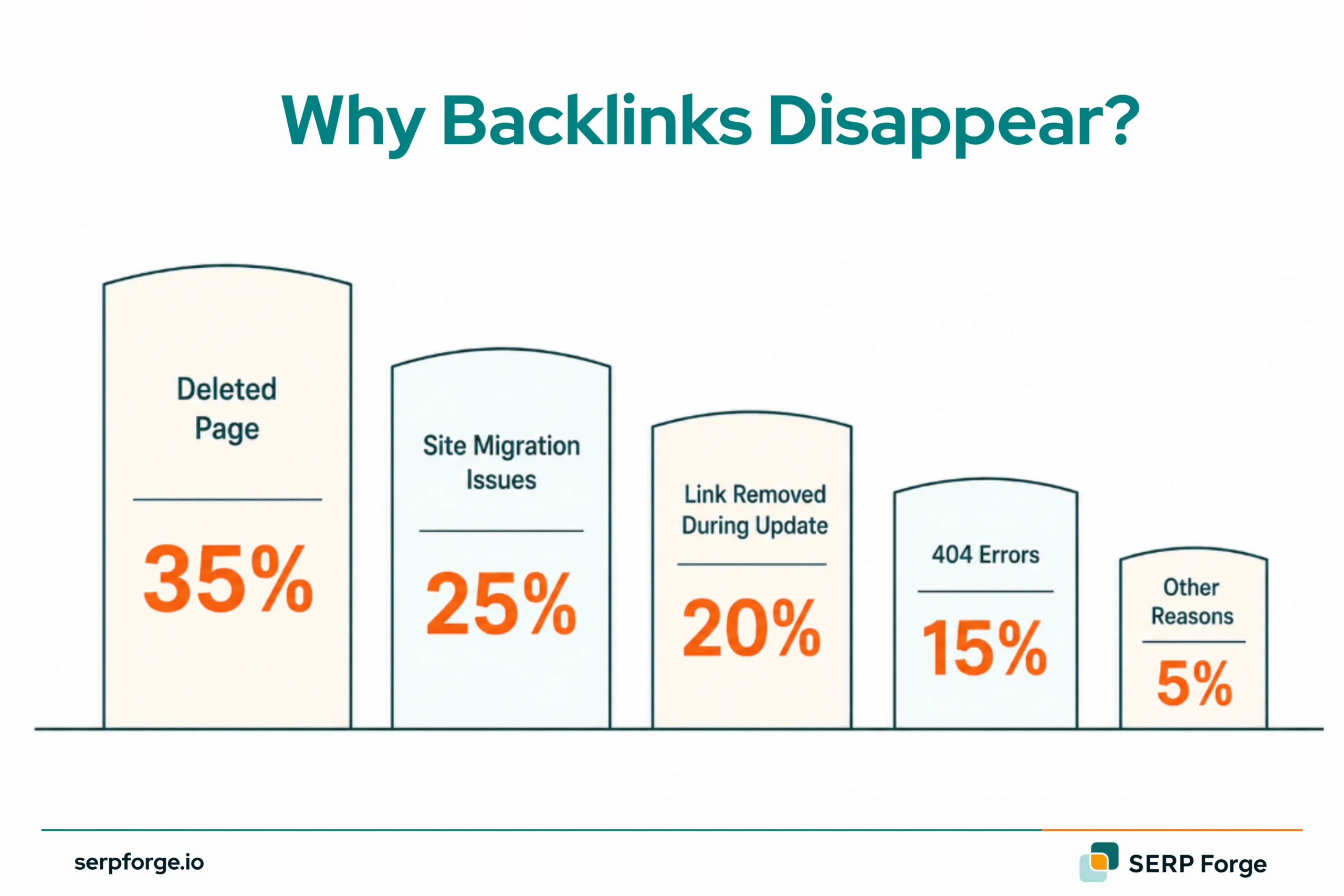
Studies suggest the average website loses 5–10% of its total backlink profile every month through natural link decay, page deletions, and site migrations. 66.5% of all links pointing to sites since 2013 are dead, and once temporary errors are counted, 74.5% of links are considered lost for SEO purposes.
How Link Reclamation Works
The link reclamation process follows a simple logic: find the gap between where links currently exist (or should exist) and where they are pointing, then close that gap through direct outreach or technical fixes.
Here is how the cycle works at a high level:
- Audit your backlink profile to establish a baseline of all current and recently lost links
- Prioritise lost links worth recovering based on the referring domain’s authority and the traffic potential it can bring.
- Pinpoint the root cause (deleted page, removed link, unlinked mention, migration error)
- Reach out to the referring site with a specific, easy-to-action request
- Follow up once or twice if no response, then monitor for recovery
The key advantage over traditional link building is that your outreach already has context.
Instead of introducing yourself cold, you can reference an existing relationship: ‘I noticed you previously linked to our resource,’ or ‘You mentioned our brand in your article.’ That context dramatically improves response rates.
It also beats the numbers: cold outreach for new link building converts at roughly 8.5%, while reclamation outreach has produced recovery rates as high as 26% in real campaigns.
Types of Link Reclamation Opportunities
Link reclamation is not one-size-fits-all. Different types of lost or missing links require different identification methods and outreach approaches.
How Do You Recover Lost Backlinks?
Lost backlinks are not gone forever; they are just disconnected. The right recovery approach depends entirely on why the link disappeared. Each scenario has a different cause, a different fix, and a very different recovery rate.
Scenario 1: The Referring Page Was Deleted
The page is gone, but the opportunity is not entirely dead. Before writing it off:
- Check the Wayback Machine to confirm your link previously existed.
- Look for a relevant replacement page on the same site and pitch your link there instead.
- If no suitable replacement exists, move on to the next recovery opportunity.
This is generally the lowest-priority scenario because recovering a link from a completely deleted page is rarely possible.
The average lifespan of a backlink on news/media sites is ~18.4 months before disappearing, while the overall average lifespan is ~20 months before being lost.
Scenario 2: The Link Was Removed During an Edit
The page is live, but your link quietly vanished during a content refresh. Act on these first because:
- The publisher already referenced you. This is a correction, not cold outreach
- Page authority is intact and ready to pass equity
Three-sentence email: what page, what was removed, here is the URL.
Scenario 3: A Site Migration Broke the Link
You caused this one, not the publisher. Fix it in two steps:
- Set up a 301 redirect from the broken URL to the most relevant live page
- For high-authority referring domains, request a direct URL update
Redirect chains leak equity silently. A direct link always wins.
Unlinked Brand Mention Reclamation
Someone already decided your brand was worth referencing; they just forgot the link. Unlinked mentions are the warmest outreach opportunity in SEO because the editorial decision is already made. You are not asking for a favour; you are asking for a correction.
Scenario 1: Your Company Was Named But Not Linked
Company mentions appear in industry roundups, news pieces, and comparison articles. The publisher knows your brand; they just did not hyperlink it. This is the easiest ask:
- Find the exact mention using Ahrefs Content Explorer or Google operator: “brandname” -site:yourdomain.com
- Confirm no link exists on the page
- Email the author with the specific URL and suggest linking for reader context
Low friction. High acceptance rate. Do this first.
Scenario 2: Your Product Appeared in a Comparison or Review
Product mentions carry commercial intent; these are readers actively evaluating tools. An unlinked product mention means traffic and conversions are being left on the table for both you and the publisher:
- Prioritize mentions on pages ranking for buyer-intent keywords
- Suggest linking directly to your product or pricing page, not the homepage
- Frame the ask around reader experience, not SEO
Scenario 3: Your Founder Was Quoted or Profiled
Founder mentions appear in interviews, speaker bios, podcast show notes, and thought leadership pieces. They are frequently published without a company link:
- Monitor the founder’s name alongside the company name in Google Alerts
- Target high-authority publications first, a Forbes or TechCrunch mention without a link is a significant missed opportunity
- Request a link to the company homepage or a relevant founder bio page
Scenario 4: Your Research Was Cited Without a Source Link
This is your highest-authority reclamation opportunity. When someone cites your data without linking to the source:
- The ask is effortless; every citation deserves a source link
- Writers almost always comply because proper attribution strengthens their own credibility
- Track down all citations using exact-match searches for your statistic or study title
One recovered research citation from a high-DR domain can outperform dozens of standard link reclamation wins.
Broken Link Reclamation
Broken links are not lost; they are stuck. The referring page still exists, the link is still in the HTML, but it just points to a dead end. That makes this less an outreach problem and more a technical one. Fix your own site first, then reach out.
Scenario 1: Your Page Returns a 404
Someone is actively trying to link to you, but they just cannot get there:
- Find which 404s have backlinks via the Ahrefs broken backlinks filter
- Set up a 301 redirect to the most relevant live page
- For high-DR domains, request a direct URL update to redirect equity over time
The redirect buys you back the link. The direct update maximizes its value.
Scenario 2: A Linked Asset No Longer Exists
PDFs, tools, and datasets publishers link to specific assets, not just pages. When those disappear:
- Restore at the original URL where possible, the cleanest fix, zero outreach needed
- If outdated, redirect to an updated version and notify top referring domains
One restored asset recovers multiple links at once.
Scenario 3: A Resource Page or Tool Was Retired
Retired resources bleed equity silently. Every day a popular calculator or guide returns a 404 with active backlinks is a day you are losing authority you already earned:
- Redirect to the closest live alternative immediately
- Assess whether restoring it is worth the effort based on the DR of referring domains pointing to it
Image Link Reclamation
Your visuals are being used right now without credit. Image link reclamation converts unauthorized usage into attributed backlinks, with no content creation required.
H3: Scenario 1: Your Image Is Used Without Attribution
Run a reverse image search on Google Images or TinEye for your key visuals:
- Adding a credit line costs the publisher nothing the compliance rate is high
- Lead with reader value: attribution helps their audience find the source
- Include the exact URL and anchor text to make it a one-click fix
Scenario 2: Your Infographic Lost Its Attribution Link
Infographics travel fast and lose their source link in the process. Two rules:
- Always publish with an embed code that has the attribution link pre-built. Prevention beats reclamation every time
- For existing unattributed uses, a single email with the source URL is usually enough
The embed code is the fix. Build it in before it goes live.
Website Migration Link Reclamation
Every other reclamation scenario involves someone else’s decision. This one is on you. A migration without proper redirects is the fastest way to lose hundreds of backlinks overnight, and most teams only discover the damage weeks later:
- Export your full backlink profile before and after every migration
- Set up 301 redirects across all affected URLs before going live, not after
- An audit for redirect chains three hops to reach your page means equity leaking at every step
- Contact your top 20 referring domains directly to update the URL
One clean redirect recovers the link. A direct URL update maximizes it.
How to Find Link Reclamation Opportunities
Your reclamation opportunities live in three places: your own backlink history, other people’s content, and your site’s technical errors.
Each requires a different tool and a different mindset. Start with what you have lost, then find what was never credited, then fix what is broken.
Here are the most effective methods and how to use each one:
Find What You Lost
These tools look backward. They show you links that existed, passed equity, and then disappeared.
Ahrefs Site Explorer is the starting point. Open the Lost Backlinks report and filter by:
- Link removed: manually deleted from a live page, highest recovery priority
- 404 not found: Your URL broke, fixable with a redirect
- DR above 20: Filter out low-authority domains not worth your time
Then check the Referring Domains report filtered by lost status. A domain that linked to you three times before is a warm prospect. A domain that was linked once two years ago is no longer linked.
The Semrush Backlink Audit provides a second dataset. No tool captures 100% of backlinks running both surfaces opportunities Ahrefs misses. Use the Lost tab, cross-reference, and prioritize overlapping results first.
Find What Was Never Credited
These tools look sideways. Someone mentioned you, but they just never linked.
Google Search Operators cost nothing and work immediately:
- (“Your Brand Name” -site:yourdomain.com ) surfaces every mention across the web, excluding your own domain
- “Your Product Name” review OR comparison OR “best tools” finds commercial-intent mentions worth prioritizing
- Search misspellings of your brand name, unlinked citations hiding in plain sight
Google Alerts is passive reclamation. Set alerts for your brand name, product names, and founder names. Every new mention lands in your inbox before it goes cold. The older an unlinked mention gets, the harder it is to recover.
Brand24 or Mention go further; they filter by domain authority and flag whether a mention includes a link or not. That second filter is what separates a genuine opportunity from noise.
Find What Is Technically Broken
These tools look inward. The link exists, the referring page is live, but your own site is returning an error.
Screaming Frog crawls your domain and surfaces every 404 URL. Cross-reference those URLs against your Ahrefs backlink data. Any 404 receiving external links is a recoverable asset; either fix the redirect or contact the referring domain directly.
This step is non-negotiable after any site migration. URL structures change, redirects get missed, and backlinks that survived the migration start pointing to dead pages nobody noticed.
Step-by-Step Link Reclamation Process
Most link reclamation fails not because the outreach is bad but because the groundwork was skipped. These seven steps are sequenced deliberately.
Each one feeds the next.
Step 1: Audit Existing Backlinks
You cannot reclaim what you have not mapped. Before identifying losses, establish what you currently have.
Use reliable backlink monitoring tools to track your existing, new, and lost links.
Export your full backlink profile from Ahrefs and Semrush and record:
- Referring domain count
- Total backlinks
- DR distribution
- Dofollow versus nofollow split
Also check your anchor text distribution to ensure reclaimed links maintain a natural backlink profile.
This is your baseline. Every reclamation win gets measured against this number.
Segment your backlinks by page, not just by domain. Knowing which pages attract the most links tells you where losses hurt most and where recovery deserves priority.
Step 2: Identify Lost Links
Pull the Lost Backlinks report filtered to the past 90 days. Sort by DR highest to lowest. The top of that list is your reclamation pipeline.
Prioritize relevant backlinks that come from authoritative, contextually aligned websites.
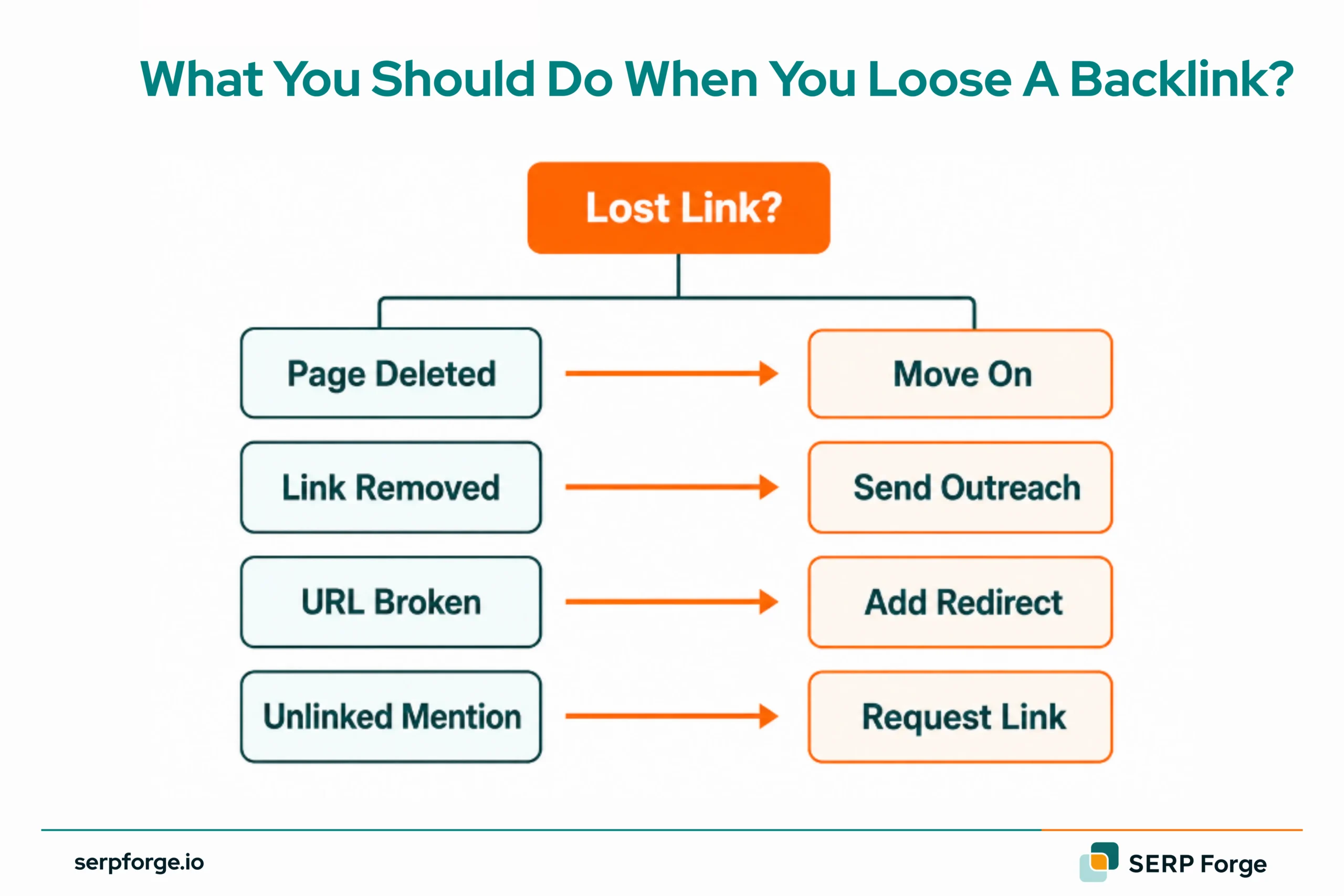
Tag each lost link with one of three statuses:
- Page deleted
- Link removed
- URL broken
That single classification step saves hours later because it tells you immediately whether you need a redirect, an outreach email, or both.
Quick filter rule: A lost link from a DR 15 directory is not worth a single minute. A lost link from a DR 70 editorial page is worth thirty.
Step 3: Analyze Root Causes
Same symptom, different causes, different fixes.
| Situation | Fix Needed |
|---|---|
| 404 on your end | Set up a redirect |
| Link manually removed | Send an outreach email |
| Referring page deleted | Pitch a replacement |
For each lost link, ask three questions. Is the referring page still live? Is your brand still mentioned on it? Was the link removed, or did the entire page disappear?
The answers determine your next move, not the outreach template.
Step 4: Gather Contact Information
The author of the specific article converts better than the generic contact form. Always go one level deeper.
- Check the byline first
- Search the author on LinkedIn if no email is visible
- Use Hunter.io to find verified addresses
- For large publications, target the SEO editor, not the general inbox
Build your contact list in the same spreadsheet as your lost links. One row per opportunity: referring URL, target URL, DR, contact name, email, and outreach status. Nothing falls through the cracks.
Step 5: Create Outreach Requests
Most reclamation emails fail because they explain too much. The publisher does not need your SEO rationale. They need to know what page, what link, and what URL to add.
Every outreach email needs exactly three things:
- A specific reference to where the mention or link appeared
- A single clear request with no ambiguity
- The exact destination URL is ready to paste
A removed editorial link sounds like a correction request. An unlinked mention sounds like a helpful suggestion. A broken link sounds like a technical heads-up. Same goal, different framing, meaningfully different response rates.
Step 6: Follow Up Strategically
66% of all outreach replies come from follow-up emails, not the original send. Skipping the follow-up means leaving the majority of your recoveries on the table.
Follow this simple sequence:
- Send your first email
- Wait five to seven business days
- Send one follow-up, one sentence, no re-pitching
- No response after two attempts, move on
Stop at two emails per contact. A non-response after two attempts is an answer. Protect your sender reputation for future campaigns.
Step 7: Monitor Link Recovery
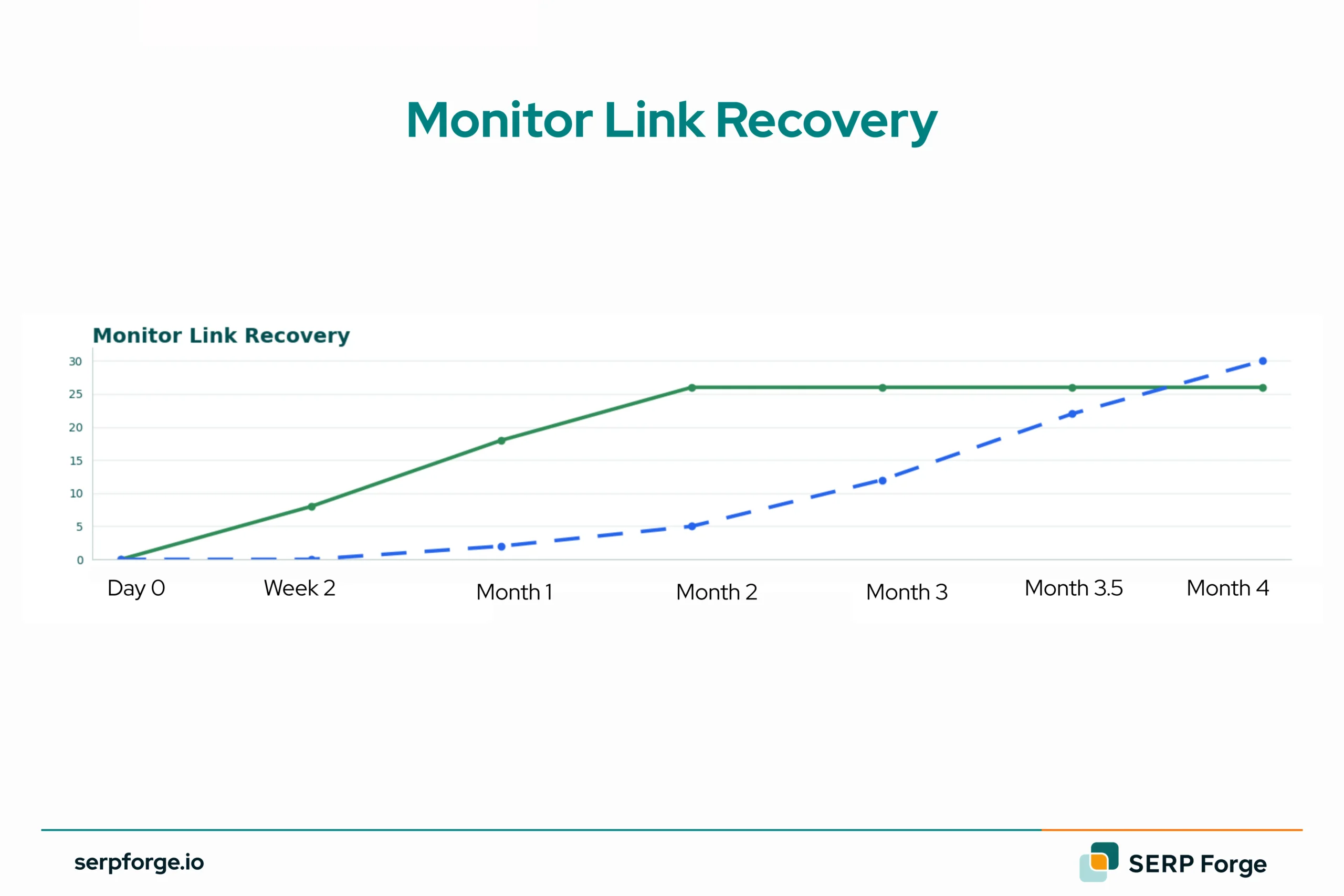
A recovered link does not always appear in your backlink tool the same day the publisher makes the change. Crawl delays mean some recoveries take days or weeks to show up.
To stay on top of recoveries:
- Set up Ahrefs or Semrush domain alerts for new links
- Update your tracking spreadsheet with the recovery date and DR
- Calculate reclamation rate monthly: links recovered divided by links contacted
That last number is your most honest performance metric. It tells you whether your targeting is sharp, your outreach is working, and whether link reclamation is delivering the ROI it should.
For the ranking impact itself, allow more patience; it takes an average of 3.1 months for the SEO benefit of a recovered link to become measurable.
Link Reclamation vs. Link Building: A Comparison
Understanding where link reclamation fits relative to traditional link building helps you allocate your time and resources more effectively.
| Factor | Link Reclamation | Link Building |
|---|---|---|
| Time Investment | Low–Medium | High |
| Success Rate | 30–60% | 5–15% |
| Cost | Low | Medium–High |
| Link Quality | Already proven | Variable |
| Effort per Link | Low (existing relationship) | High (cold outreach) |
| Best For | Recovering lost authority | Growing new authority |
The data consistently shows that link reclamation delivers a higher success rate and lower cost-per-link than cold link building outreach.
For most established sites, running a quarterly link reclamation audit before investing in new link-building campaigns is the highest-leverage SEO activity available.
Conclusion
Link reclamation is one of the most efficient strategies in your SEO toolkit. By reclaiming lost or uncredited backlinks, you recover valuable link equity without the time and cost of building new links from scratch.
Start with a full backlink audit to establish your baseline, prioritize high-authority lost links and unlinked mentions, and build a consistent outreach and follow-up process.
Use a link building checklist to keep your broader backlink strategy structured and consistent.
Even a 20–30% recovery rate on your top link opportunities can meaningfully move your domain authority and organic rankings.
Run a link reclamation audit before your next link building campaign, and you may find you already own more backlink authority than you realize.
FAQs
How do I find lost backlinks?
Use Ahrefs Site Explorer’s Lost Backlinks report. Filter by ‘link removed’ for manually deleted links. Semrush Backlink Audit is a solid alternative. For free, compare Google Search Console’s Links report over time.
What is an unlinked brand mention?
It’s when another website mentions your brand, product, or founder but doesn’t link to you. The mention exists, but the link equity doesn’t. Outreach to convert it typically yields a 20–40% success rate.
How long does link reclamation take?
Initial audit takes 4–8 hours, while ongoing maintenance requires 2–4 hours per month. Most publishers typically respond within 5–7 business days.
Is link reclamation worth it?
Yes. It’s warmer than cold outreach, cheaper than building new links, and success rates run 30–60% vs. 5–15% for cold link building
Which tools are best for backlink recovery?
Ahrefs for lost links. Semrush for broken link detection. Screaming Frog for 404 audits. Ahrefs Content Explorer or Brand24 for unlinked mentions. Google Alerts for free passive monitoring.
Can reclaimed links improve rankings?
Yes, they pass the same equity as any backlink. Most sites see measurable ranking improvements within 2–3 months of recovery.
How often should I audit?
Quarterly for most sites. Monthly for high-traffic or active publishers. Immediately after any site migration, and then monthly for six months.