


SaaS websites don’t struggle with content; they struggle with how that content is discovered, processed, and ranked. With complex structures, dynamic pages, and constant updates, even small technical gaps can limit your visibility and growth.
This guide breaks down technical SEO into a clear, actionable checklist so you can fix what’s holding your site back, improve performance, and build a strong foundation that supports consistent rankings and scalable growth.
Whether you’re dealing with indexing issues, slow page speed, or a growing library of product and content pages, this checklist will help you prioritize fixes, streamline your site structure, and make your SaaS website easier to crawl, understand, and scale over time.
What is Technical SEO?
Technical SEO refers to optimizing the backend structure of your website so search engines like Google can efficiently crawl, render, and index your pages. It focuses on how your site is accessed and understood by bots like Googlebot, ensuring that important content is discoverable, properly processed, and eligible to rank.
This includes elements like site architecture, URL structure, page speed, mobile usability, and structured data, all of which directly impact how your site performs in search.
For SaaS websites, technical SEO becomes even more important due to dynamic content, JavaScript-heavy frameworks, and complex user journeys. If your pages aren’t rendered correctly or key sections aren’t indexed, even high-quality content may not appear in search results.
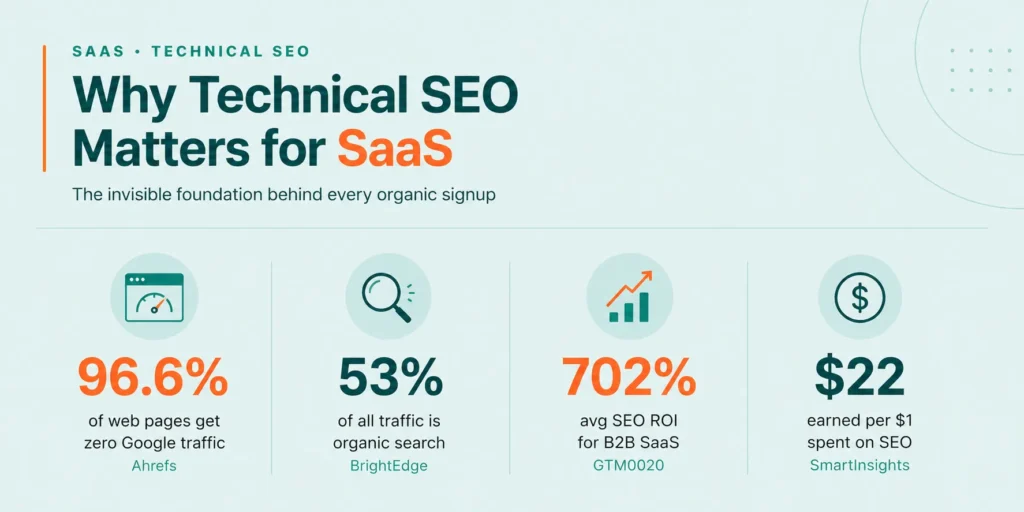
According to the HubSpot State of Marketing Report, over 92% of marketers plan on or are already using SEO optimization for traditional and AI-powered search engines.
Why is Technical SEO Important for SaaS Companies?
Technical SEO is critical for SaaS companies because their websites are often complex, fast-growing, and built with dynamic frameworks that can create hidden performance and visibility issues.
It also supports the entire customer journey, from discovery to conversion. When your site loads quickly, follows a clear structure, and avoids duplication or indexing issues, users can easily navigate and find relevant information without friction.
Strong technical SEO doesn’t automatically improve rankings on its own; your SaaS site is more likely to perform well when:
- Improves crawlability so important pages are discovered and prioritized efficiently
- Ensures proper rendering of dynamic content, avoiding missing or incomplete page elements
- Controls indexing to prevent duplicate or low-value pages from affecting performance
- Enhances page speed and Core Web Vitals for better user experience
- Supports scalable site structure as content and product pages grow
- Strengthens overall site performance, helping improve visibility and conversions
Technical SEO works best when reviewed regularly. Small fixes over time can prevent bigger issues later.
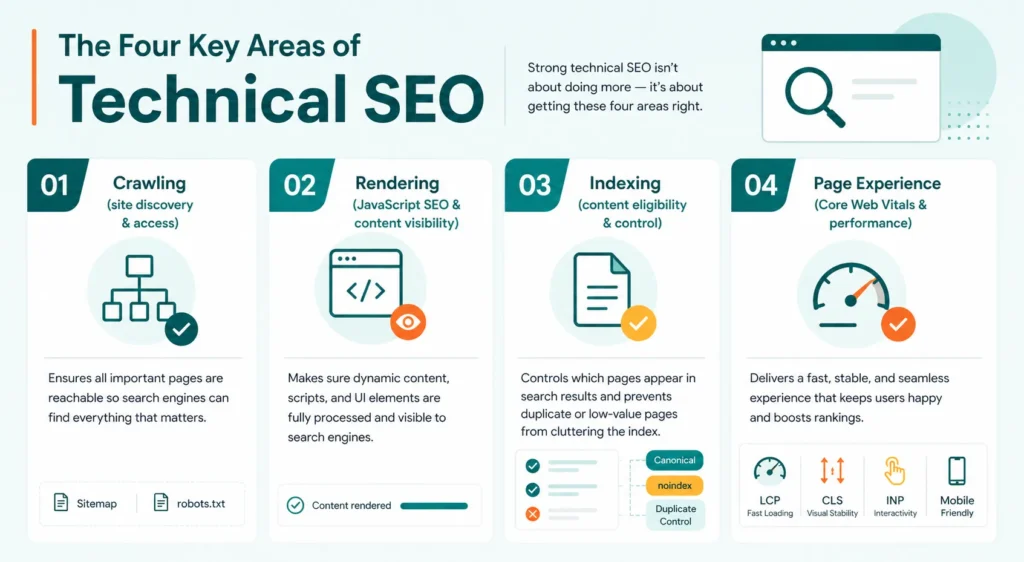
The Four Key Areas of Technical SEO
Strong technical SEO doesn’t rely on just one factor; your SaaS website performs better when these core areas are aligned and optimized:
- Crawling (site discovery & access) – Ensures all important pages are reachable through internal linking, XML sitemaps, and proper robots.txt rules, so nothing valuable gets missed
- Rendering (JavaScript SEO & content visibility) – Makes sure dynamic content, scripts, and UI elements are fully processed and visible, avoiding issues where key content fails to load properly
- Indexing (content eligibility & control) – Focuses on which pages should appear in search results by managing duplicate content, canonical tags, and noindex directives for low-value URLs
- Page Experience (Core Web Vitals & performance) – Improves loading speed, mobile responsiveness, visual stability, and overall usability to create a smooth and fast user experience
If even one of these areas is weak, it can impact the others. Technical SEO works best when all four are optimized together.
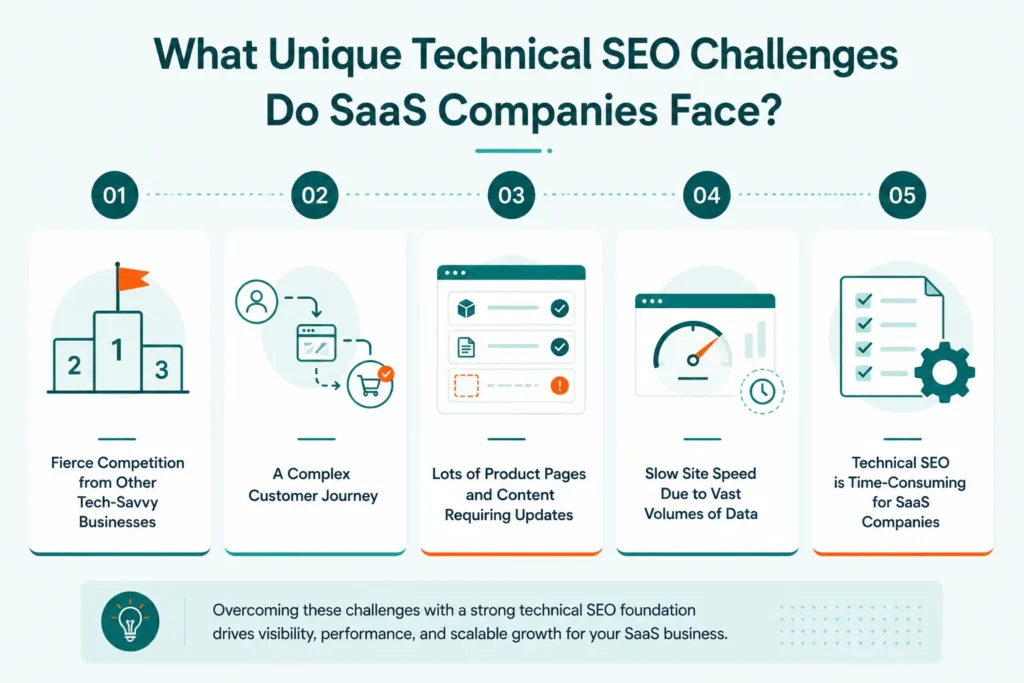
What Unique Technical SEO Challenges Do SaaS Companies Face?
SaaS websites come with unique technical complexities that can impact visibility, performance, and scalability; your site is more likely to face challenges when:
Fierce Competition from Other Tech-Savvy Businesses
The SaaS space is highly competitive, with companies investing heavily in SEO and performance optimization; even small technical gaps like weak internal linking or poor structure can affect rankings.
A Complex Customer Journey
SaaS users move through multiple stages before converting, from awareness to decision-making; managing different page types while maintaining a clear structure and navigation becomes challenging.
Lots of Product Pages and Content Requiring Updates
SaaS platforms constantly expand with new features, integrations, and documentation; this can lead to duplicate content, outdated pages, and indexing confusion if not handled properly.
Slow Site Speed Due to Vast Volumes of Data
Heavy scripts, dashboards, and large data loads can slow down performance; this impacts user experience, engagement, and overall site performance.
Technical SEO is Time-Consuming for SaaS Companies
Ongoing updates, audits, and fixes are required to maintain technical health; managing all of this consistently can be resource-intensive for growing SaaS teams.
A Complete Technical SEO Checklist for SaaS
A strong technical SEO setup doesn’t happen by chance; your SaaS website is more likely to perform well when every structural element is clearly defined and optimized:
Site Architecture
A strong site architecture ensures your SaaS website is easy to navigate, logically structured, and aligned with search intent; this helps improve crawl efficiency, internal linking, and overall user experience.
1. Define distinct page types (features, use cases, integrations, blog, docs) with no intent overlap
Clearly separate page types based on user intent to avoid keyword cannibalization and confusion; each page should target a specific purpose and audience.
2. Keep all key pages within ≤3 clicks from homepage
Maintain a shallow click depth so important pages are easily accessible; this improves crawlability and ensures high-value pages are prioritized.
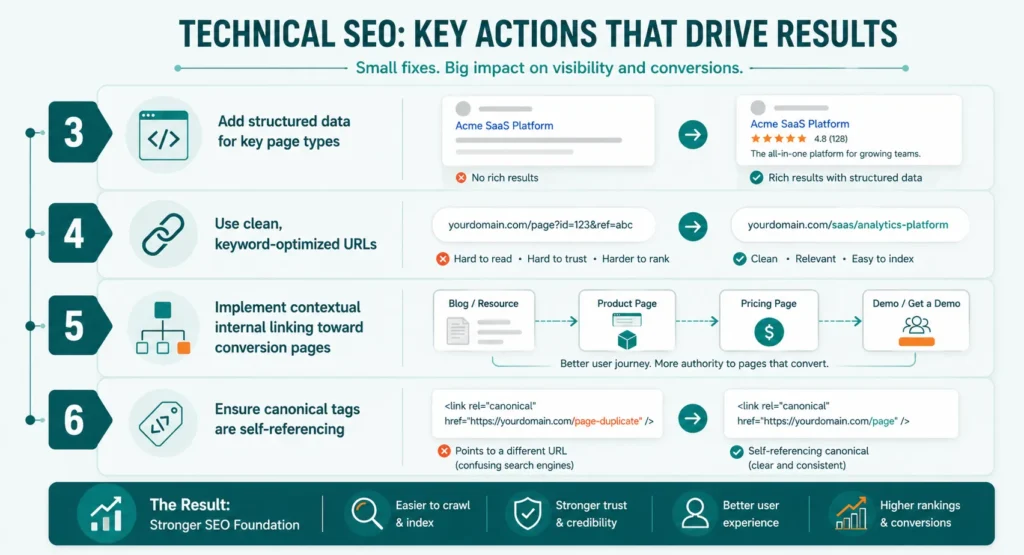
3. Use subfolders for SEO content; isolate app on subdomain (app.)
Organize marketing content within subfolders for better SEO performance, while keeping the application or dashboard on a separate subdomain to avoid crawl conflicts.
4. Standardize clean, static URLs (no parameters for core pages)
Use simple, readable URLs without unnecessary parameters; clean URLs improve indexing, user trust, and consistency across the site.
5. Implement contextual internal linking toward conversion pages
Use internal links strategically to guide users and distribute authority to high-intent pages like product, pricing, or demo pages.
6. Ensure canonical tags are self-referencing on all indexable pages
Apply self-referencing canonical tags to prevent duplicate content issues and maintain clarity on which URLs should be indexed.
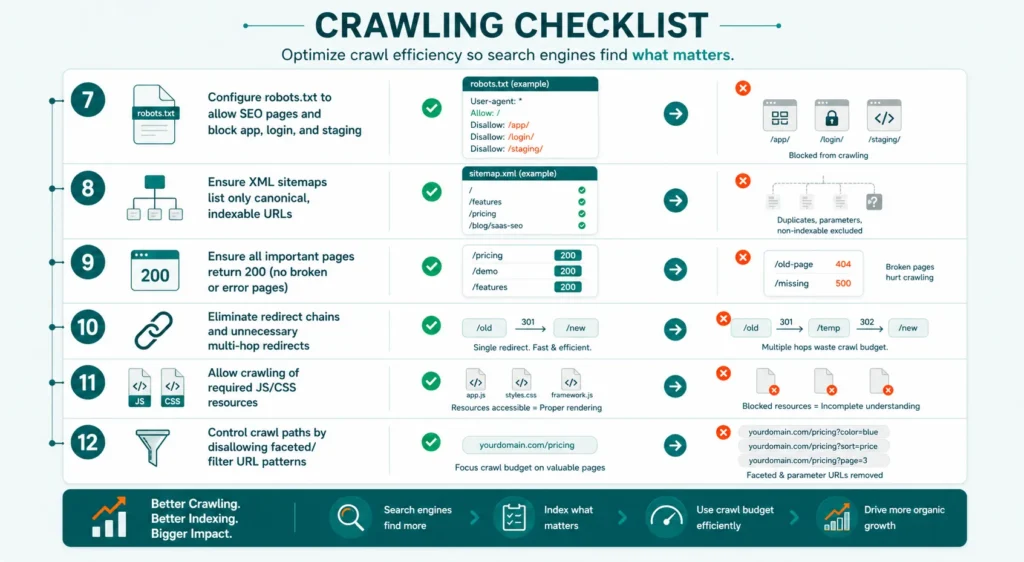
Crawling
Efficient crawling ensures search engines can discover and access all important pages without wasting resources on low-value or restricted areas; when crawl paths are clean and controlled, your SaaS site becomes easier to navigate and index at scale.
7. Configure robots.txt to allow SEO pages and block app, login, and staging
Set clear rules in robots.txt to allow access to important SaaS marketing and SEO pages while blocking sensitive or irrelevant areas like app dashboards, login pages, and staging environments.
8. Ensure XML sitemaps list only canonical, indexable URLs
Include only clean, indexable URLs in your sitemap; this helps search engines focus on high-value pages and avoid confusion caused by duplicates or non-indexable links.
9. Ensure all important pages return 200 (no broken or error pages)
Verify that key pages return a proper 200 status code; broken links or error pages can disrupt crawling and negatively impact site performance.
10. Eliminate redirect chains and unnecessary multi-hop redirects
Avoid multiple redirects between URLs; keeping redirects minimal improves crawl efficiency and reduces delays in accessing final pages.
11. Allow crawling of required JS/CSS resources
Ensure important JavaScript and CSS files are not blocked; these resources are necessary for properly rendering and understanding your page content.
12. Control crawl paths by disallowing faceted/filter URL patterns
Prevent crawling of unnecessary filter or parameter-based URLs; this helps conserve crawl budget and keeps focus on valuable pages.
Rendering
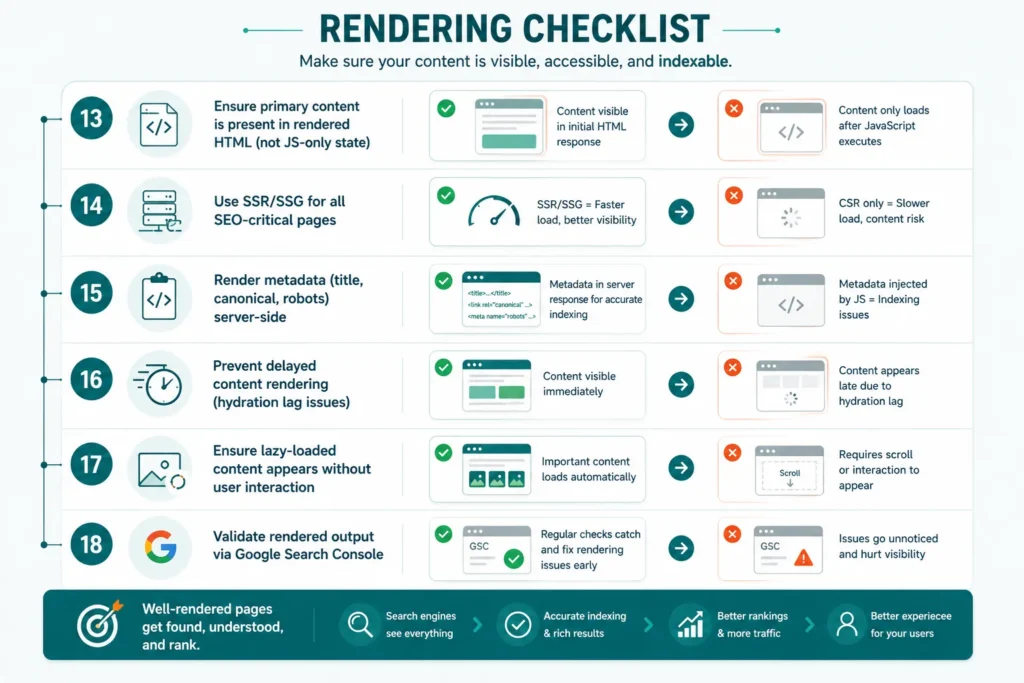
Rendering ensures your content is fully visible and accessible after scripts are processed; for SaaS websites that rely on JavaScript frameworks, proper rendering is critical to make sure important content isn’t missed or delayed.
13. Ensure primary content is present in rendered HTML (not JS-only state)
Make sure key content is available in the initial HTML response; relying only on JavaScript can prevent content from being properly processed.
14. Use SSR/SSG for all SEO-critical pages
Implement server-side rendering (SSR) or static site generation (SSG) for important pages; this ensures faster load times and better content visibility.
15. Render metadata (title, canonical, robots) server-side
Ensure essential metadata is included in the server response; this helps maintain accurate indexing and page interpretation.
16. Prevent delayed content rendering (hydration lag issues)
Avoid delays caused by JavaScript hydration; critical content should load immediately without waiting for scripts to execute.
17. Ensure lazy-loaded content appears without user interaction
Configure lazy loading so content loads automatically; important elements should not require scrolling or interaction to appear.
18. Validate rendered output via Google Search Console
Regularly test how pages are rendered using Google Search Console; this helps identify and fix rendering issues quickly.
Indexing
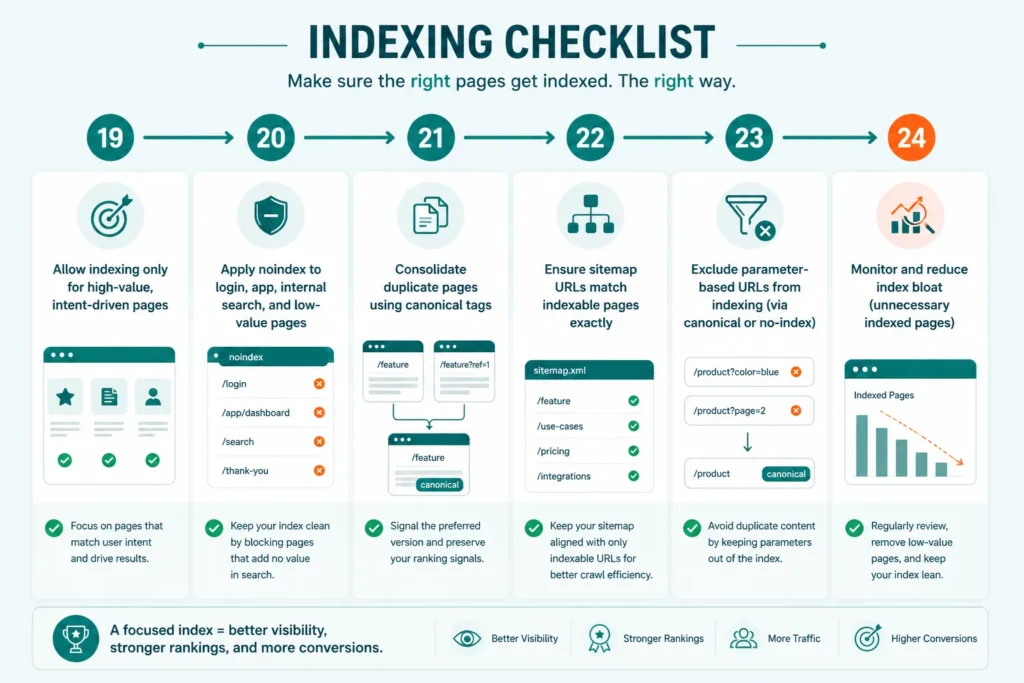
Indexing ensures that only the most valuable and relevant pages from your SaaS website appear in search results; when indexing is controlled properly, it improves visibility, avoids duplication, and helps search engines focus on pages that drive traffic and conversions.
19. Allow indexing only for high-value, intent-driven pages
Focus on pages that align with user intent, such as feature pages, use cases, and key landing pages; this improves overall search performance.
20. Apply noindex to login, app, internal search, and low-value pages
Restrict indexing for pages that don’t provide search value; this prevents clutter and keeps your index clean.
21. Consolidate duplicate pages using canonical tags
Use canonical tags to signal the preferred version of similar or duplicate pages; this avoids confusion and preserves ranking signals.
22. Ensure sitemap URLs match indexable pages exactly
Keep your XML sitemap aligned with indexable URLs only; this ensures consistency and better crawl efficiency.
23. Exclude parameter-based URLs from indexing (via canonical or no-index)
Prevent indexing of URLs with filters or tracking parameters; this helps avoid duplicate content issues.
24. Monitor and reduce index bloat (unnecessary indexed pages)
Regularly review indexed pages and remove low-value or redundant URLs; this keeps your site focused and optimized for performance.
Page Experience
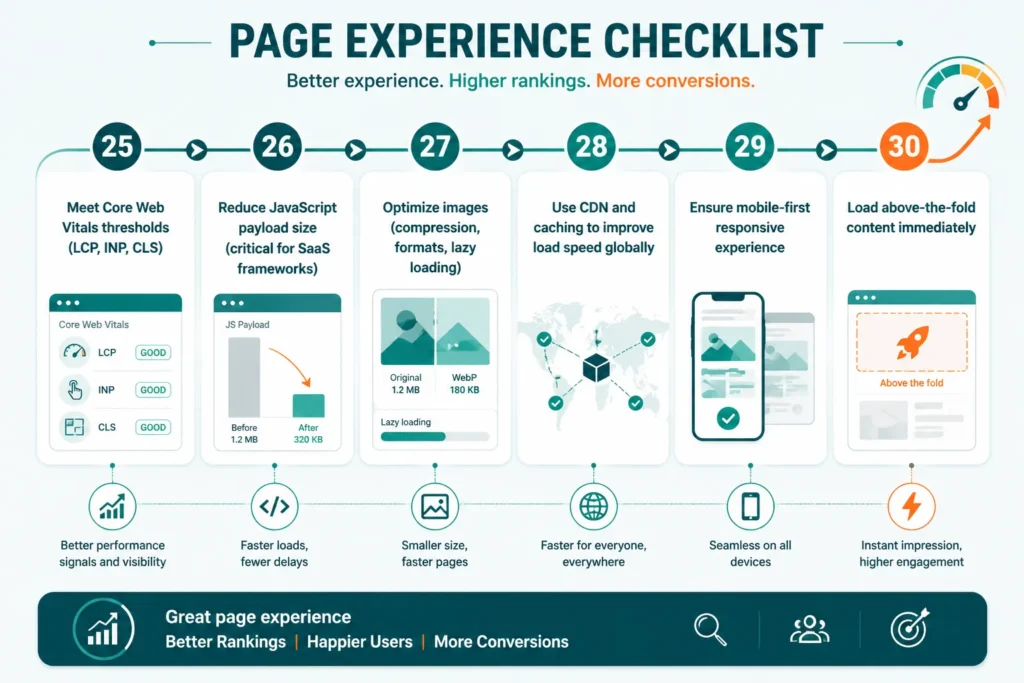
Page experience focuses on how fast, stable, and user-friendly your SaaS website feels; when performance and usability are optimized, it not only improves rankings but also keeps users engaged and more likely to convert.
25. Meet Core Web Vitals thresholds (LCP, INP, CLS)
Ensure your site meets performance benchmarks for loading speed, interactivity, and visual stability; this directly impacts user experience and search visibility.
26. Reduce JavaScript payload size (critical for SaaS frameworks)
Minimize heavy scripts and unused code; lighter JavaScript improves load time and prevents delays in rendering important content.
27. Optimize images (compression, formats, lazy loading)
Use compressed images and modern formats like WebP; implement lazy loading to improve speed without affecting visual quality.
28. Use CDN and caching to improve load speed globally
Leverage content delivery networks and browser caching; this ensures faster load times for users across different locations.
29. Ensure mobile-first responsive experience
Design and optimize your site for mobile devices first; a responsive layout ensures consistent performance across all screen sizes.
30. Load above-the-fold content immediately
Prioritize visible content so it loads instantly; this reduces perceived load time and improves user engagement.
Security & Schema
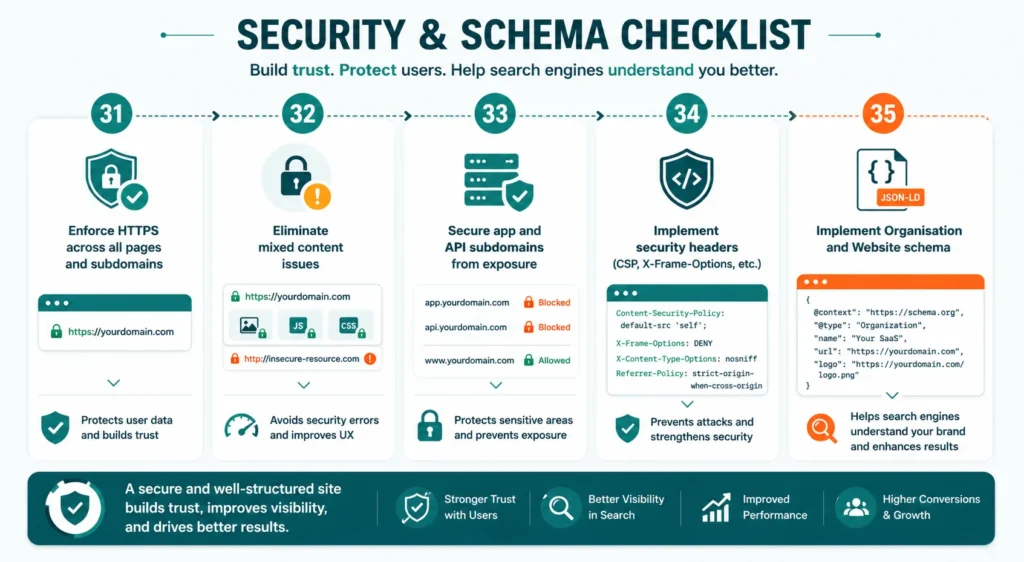
Security and structured data play a key role in building trust, protecting user data, and helping search engines better understand your SaaS website; a secure and well-structured site improves credibility, visibility, and overall performance.
31. Enforce HTTPS across all pages and subdomains
Ensure every page and subdomain uses HTTPS; this protects user data and establishes trust.
32. Eliminate mixed content issues
Avoid loading insecure (HTTP) resources on secure pages; mixed content can break security and impact user experience.
33. Secure app and API subdomains from exposure
Protect sensitive areas like app dashboards and APIs; restrict access and prevent unnecessary indexing or exposure.
34. Implement security headers (CSP, X-Frame-Options, etc.)
Use security headers to prevent common vulnerabilities; this helps safeguard your site from attacks and misuse.
35. Implement Organisation and Website schema
Add structured data like Organization and Website schema; this helps search engines understand your brand and improves search appearance.
Improve SaaS Technical SEO for Better Rankings with SERP Forge
Technical SEO needs consistent attention, not one-time fixes; with SERP Forge, you get a structured approach to identify issues, improve site performance, and keep your SaaS website optimized as it grows.
From fixing crawl and indexing gaps to improving page speed and site architecture, the focus stays on building a strong technical foundation that supports better rankings, higher visibility, and steady organic growth.
Conclusion
Technical SEO is the backbone of a high-performing SaaS website; without a strong foundation, even the best content and strategies can fall short.
From site architecture and crawling to rendering, indexing, and page experience, every element plays a role in how your site performs in search.
By following a structured checklist and fixing issues consistently, SaaS companies can improve visibility, enhance user experience, and support long-term growth.
Technical SEO FAQs
How can SaaS companies improve crawl budget efficiency?
SaaS companies can improve crawl efficiency by prioritizing high-value pages, blocking unnecessary URLs (like filters or parameters), fixing broken links, and maintaining a clean internal linking structure; this ensures important pages are discovered and crawled more frequently.
What role does site architecture play in SaaS SEO performance?
Site architecture helps organize content logically and improves navigation for both users and search engines; a clear structure ensures important pages are easily accessible, reduces crawl depth, and supports better indexing and rankings.
How does JavaScript impact technical SEO in SaaS websites?
JavaScript can delay or block content rendering if not optimized properly; this may cause important content or metadata to be missed, affecting visibility and indexing, especially on dynamic SaaS websites.
What are the best tools for managing SaaS technical SEO?
Popular SEO tools include Google Search Console for monitoring performance and indexing, Screaming Frog SEO Spider for technical audits, and Ahrefs for backlink and site analysis.
How can SaaS companies handle international SEO and localization effectively?
SaaS companies can manage international SEO by using hreflang tags, creating region-specific pages, and structuring URLs clearly (like subfolders or subdomains); this helps target the right audience while avoiding duplication issues.

