


A backlink audit can tell you a lot about what is happening behind your rankings.
You may find links helping important pages climb. You may also find toxic backlinks, lost links, strange anchor text or old agency work that should have been checked months ago.
That is even more important in 2026. Ahrefs now positions Site Explorer around organic traffic, AI visibility and backlink profile analysis, while Semrush says its database covers over 43 trillion backlinks across 808 million domains.
We’ll walk through a simple backlink audit process you can run with Google Search Console, Ahrefs and the Google Disavow Tool.
What Is a Backlink Audit?
A backlink audit is a page-by-page review of who links to your site, which pages receive those links and whether those links support rankings.
We believe that a backlink audit that only finds toxic links is half an audit.
If the report does not show which pages need links, which lost links are worth reclaiming and which competitor sources are realistic, it is a cleanup task. A thorough backlink audit should protect the site and shape the next link-building plan.
The audit should answer practical SEO questions:
- Which pages are underpowered compared to competitors?
- Which anchors look over-optimised?
- Which links were lost and should be reclaimed?
- Which domains look risky enough to remove or disavow?
A backlink profile audit is useful before starting a link building campaign because it shows where authority is already concentrated.
For example, your homepage may have 80% of all referring domains while service pages have almost none. In that case, the issue is page-level authority distribution.
The audit should end with a decision list:
- Keep
- Monitor
- Reclaim
- Remove
- Disavow
That makes the audit useful for SEO action instead of simple reporting.
If one money page has 40 referring domains and every top competitor has 120+, the issue is link gap. If the same page has 60 exact-match anchors from weak domains, the issue is link risk.
A good backlink audit tells you which problem you are dealing with before you build another link.
Which Tools Do You Need for a Backlink Audit?
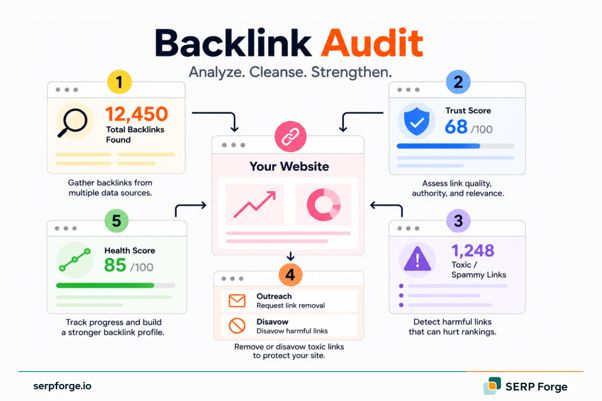
A backlink audit needs three layers of data: Google’s own link view, third-party backlink depth and a safe way to handle harmful domains.
Do not depend on one backlink audit tool. Each tool crawls the web differently, so the smartest audit uses multiple sources.
Google Search Console
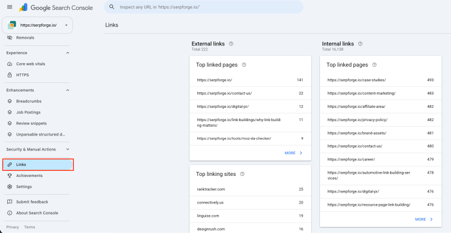
Google Search Console should be your starting point.
It shows the backlinks Google has found for your property. In the Links report, check external links, top linked pages, top linking sites and top linking text.
Use Google Search Console to answer:
- Which pages get the most links?
- Which domains link most often?
- Which anchor text appears repeatedly?
- Is there a manual action?
The Manual Actions report is especially important after a ranking drop. If Google has flagged unnatural links, you will see the issue there.
Google Search Console is also useful for spotting page-level imbalance. If the homepage has most links and key service pages have very few, your link building plan needs better page targeting.
Ahrefs
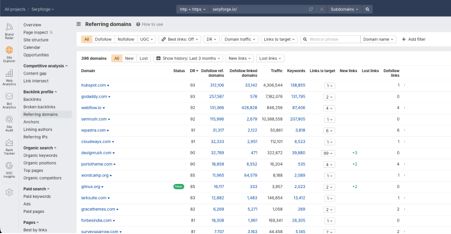
Ahrefs gives a deeper audit view.
Use Site Explorer to review referring domains, backlink growth, lost links and anchor text. It also helps compare your domain against competitors already ranking for the same keywords.
Use Ahrefs to check:
- Referring domain growth
- New and lost backlinks
- Link gaps against competitors
- Anchor text by target page
The key is to use the tool for decisions.
If a competitor’s service page has links from comparison articles, partner pages and niche publications, add those domains to your prospect list. If your page has links from coupon blogs, spun guest posts or unrelated directories, mark them for manual review.
Google Disavow Tool
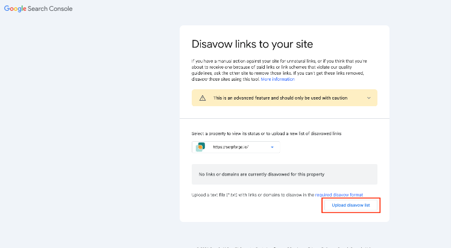
The Google Disavow Tool is for high-risk cases.
Google says disavow is an advanced feature. It is meant for situations involving many spammy, artificial or low-quality links that could cause a manual action.
Use it when links show a repeated harmful pattern.
Examples include:
- Link farm domains
- Paid links from old campaigns
- Spam networks targeting one page
- Domains that ignore removal requests
Avoid uploading a disavow file because a tool labels links as “toxic.” Review the domain first.
A disavow file should be small, documented and easy to defend later.
How Do You Run a Backlink Audit Step by Step?
A backlink audit should end with a decision list.
You should know which links to keep, which links to reclaim, which links to monitor and which links need cleanup.
Use Google Search Console for first-party link data. Use Ahrefs for deeper backlink review. Use the Google Disavow Tool only when harmful links create real risk.
Follow this sequence before you remove, disavow or build any new links:
Step 1: Benchmark Your Profile
Use Ahrefs for this step.
Do this:
- Open Ahrefs Site Explorer.
- Enter your domain.
- Note referring domains, DR and backlink growth.
- Open the Top Pages by Links report.
- Add 3 to 5 ranking competitors.
Now compare page-level authority.
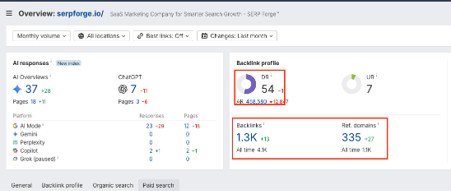
A domain-level comparison can mislead you. Your homepage may have many links while the target service page has almost none.
Check this:
- Your target page referring domains
- Competitor page referring domains
- Your top linked pages
- Competitor top linked pages
Decision:
If your target page has fewer referring domains than each ranking competitor, the issue is link gap.
If referring domains are similar, check link quality and anchor text next.
Add the gap to your audit sheet before moving forward.
Step 2: Export Your Backlinks
Use Google Search Console first.
Do this:
- Open Google Search Console.
- Go to Links.
- Export Top linking sites.
- Export Top linked pages.
- Export Top linking text.
- Export Latest links.
Then use Ahrefs for a second export.
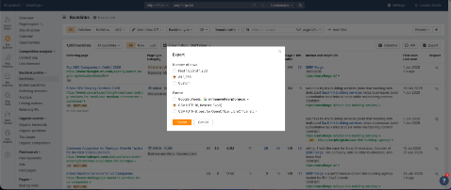
Open Site Explorer and export:
- Backlinks
- Referring domains
- Anchors
- Lost backlinks
Combine both exports in one sheet.
Use these columns:
- Linking domain
- Linking URL
- Target URL
- Anchor text
- First seen date
- Link status
Move forward when:
If Google Search Console shows links missing from Ahrefs, keep them in the sheet.
If Ahrefs shows extra links, add them too. A backlink audit needs enough data to reveal patterns.
Step 3: Review Referring Domains
Use Ahrefs Referring Domains report for this step.
Start with domain-level review before reviewing every individual link.
Do this:
- Open Referring Domains.
- Sort by organic traffic.
- Check topic relevance.
- Review recent link growth.
- Open suspicious domains manually.
Look beyond DR.
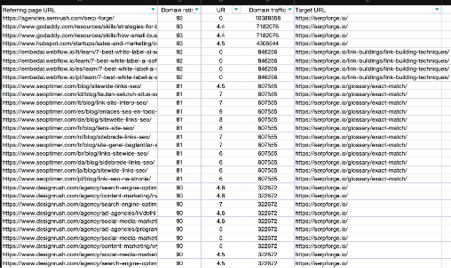
A DR 18 niche blog can still be safe if it has relevant content. A DR 70 website can be risky if it sells posts across casino, crypto, SaaS and finance.
Check each suspicious domain for:
- Real organic traffic
- Consistent topic focus
- Real author or business signals
- Sensible outbound links
Mark every domain as Keep, Monitor, Remove or Disavow.
Spend the most time on domains linking to money pages. Risk on a revenue page deserves faster review than spam links to an old blog post.
Step 4: Find Toxic Backlinks
Use Ahrefs and Google Search Console together.
Start in Ahrefs Backlinks report.
Do this:
- Filter links from low-traffic domains.
- Check links with exact-match anchors.
- Open pages with strange topics.
- Review links to commercial pages.
- Compare with Google Search Console exports.
Toxic backlinks usually appear as patterns. This is also where you check for negative SEO attacks, link spam and unnatural links from domains you never approved.
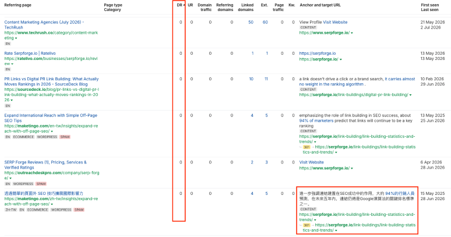
Look for:
- Link farm domains
- Hacked pages
- Auto-generated posts
- Foreign-language spam
Do not panic over one weak link.
Most websites collect scraper links or random spam over time. The bigger risk is repeated manipulation.
Check for patterns like:
- Same money anchor across many domains
- Several spam links to one service page
- Sudden backlink spike after no campaign
- Links from sites that publish every niche
Take action if:
If the link is weak but isolated, mark it as Monitor.
If the same pattern repeats across many domains, add it to your cleanup list.
Step 5: Check Anchor Text
Use Ahrefs Anchors report.
Review anchor text at two levels.
Do this:
- Open Anchors for the full domain.
- Export the anchor list.
- Filter commercial phrases.
- Repeat the check for priority pages.
Then compare anchor types.
A safer profile usually includes branded anchors, URL anchors, topic phrases and natural sentence fragments.
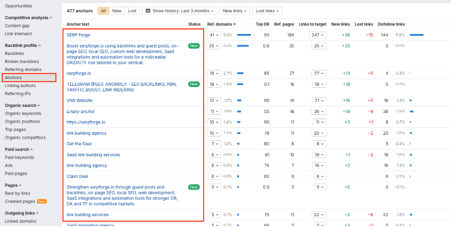
Review carefully when one phrase appears too often.
Examples:
- Best SEO agency
- Buy backlinks
- Cheap lawyer service
- Link building company
Keep or review:
If one money anchor repeats across weak domains, review those domains manually.
If the anchor appears on relevant websites with normal context, keep it.
This step is important after guest posts, niche edits or old agency campaigns.
Step 6: Reclaim Lost Links
Use Ahrefs Lost Backlinks report.
Lost links can reduce page authority quietly, especially when they pointed to key pages.
Do this:
- Open Backlinks.
- Select Lost.
- Filter by last 30 to 90 days.
- Sort by DR, traffic and target page.
- Open the old linking page.
Check why the link disappeared.
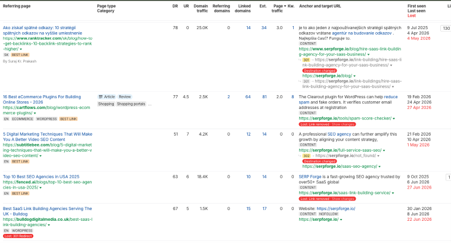
Common reasons include:
- Page deleted
- Article updated
- URL changed
- Link replaced
Now decide whether the link is worth recovering.
Reclaim links from relevant websites, partner pages, media mentions and useful resource pages.
Reclaim it when:
If the page still exists, ask the editor to restore the link.
If the old target URL changed, share the updated URL.
If the linking page is low quality, skip it and save your outreach time.
Step 7: Prepare a Disavow File
Use the Google Disavow Tool only after manual review.
This step is for repeated harmful patterns, old paid campaigns or links that may create manual action risk.
Before preparing the file, check your cleanup sheet.
Add only domains that show:
- Obvious spam pattern
- No editorial value
- Repeated risky anchors
- Failed or impossible removal
Use domain-level entries for link farms and spam networks.
Format:
domain:example.com
Use URL-level entries only when one page is risky and the wider domain looks useful.
Before upload, check the file twice.
Make sure no useful niche websites, partners or real publishers are included.
Upload only when:
The risk is serious enough to defend.
After upload, monitor Google Search Console for manual actions, impressions and ranking changes. Google needs time to recrawl and process the updated link signals.
How Do You Clean Up a Toxic Backlink Profile?
Cleaning a toxic backlink profile starts with sorting risk by pattern.
Do not remove links one by one without grouping them first. Group backlinks by domain, anchor text, target page and placement type.
Start with a cleanup sheet.
Use these columns:
- Linking domain
- Target URL
- Anchor text
- Follow or nofollow
- Traffic estimate
- Action needed
- Notes
Then divide links into four groups:
- Keep
- Monitor
- Remove
- Disavow
Keep links from relevant websites with real traffic and natural placement. Monitor weak links that look low quality but create no obvious pattern. Remove links you can control or request for removal. Disavow domains that show repeated manipulation and cannot be removed.
Look closely at exact-match anchors.
If one page has several links using the same commercial keyword, check those domains first. That pattern creates more risk than one random spam link.
Manual removal should come before disavow when possible. For manual action recovery, keep proof of link removal outreach so the cleanup is easy to explain later.
Send a short removal request with:
- The linking URL
- The target URL
- The anchor text
- The removal request
Track the date and response.
If the domain is a link farm, hacked site or spam network, domain-level disavow is usually cleaner than URL-level disavow.
After cleanup, monitor Search Console for impressions, clicks and manual action status. Recovery takes time because Google needs to recrawl and process link changes.
How Often Should You Run a Backlink Audit?
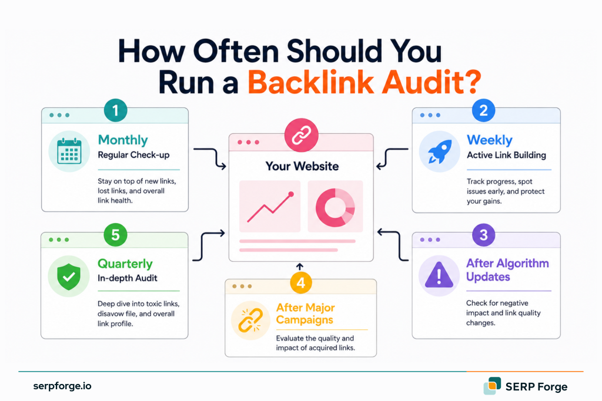
Run a full backlink audit every quarter if your site depends on organic traffic.
That schedule helps you catch spam links, lost links and anchor shifts before they build into larger problems. It also gives you a cleaner base before each link building push.
Monthly checks are better when link activity is high.
Use a monthly check if:
- You are building links actively
- You changed SEO vendors recently
- You work in finance, SaaS, legal or health
- Your site had a sudden ranking drop
A stable site with a small backlink profile can run a full audit every six months.
You should also audit after specific events:
- Google update
- Traffic drop
- Agency handover
- New link campaign
- Negative SEO suspicion
The key is to match audit frequency to risk. A site buying placements every month needs tighter monitoring than a site earning links slowly through PR.
Which Backlink Audit Mistakes Can Hurt Rankings?
The biggest backlink audit mistake is acting before reviewing the context.
Many SEOs export a toxic-link report and start disavowing domains too fast. That can remove links Google was already ignoring or links that still had value.
Avoid these mistakes during your backlink audit:
- Disavowing every low-DR link
- Trusting toxicity scores without manual review
- Ignoring lost backlinks
- Checking domain-level metrics only
Skipping referring domain diversity and backlink monitoring can also hide problems until rankings drop.
A low-DR link from a niche blog can still be safe. A DR 70 domain can still be risky if the page sells unrelated links.
Anchor text is another common blind spot.
One exact-match anchor is rarely the full issue. The risk appears when the same commercial anchor repeats across weak domains.
Lost links also deserve attention.
A backlink audit should show which valuable links disappeared. Reclaiming one relevant link can be easier than earning a new one from scratch.
The final mistake is treating the audit like cleanup only.
A good audit should also show link gaps, competitor sources and pages that need more authority. Otherwise, the report finds risk but misses growth.
[CTA BLOCK]
Want to know which backlinks to keep, reclaim or remove?
SERP Forge can audit your backlink profile, competitor gaps and toxic link patterns.
Book a backlink audit before risky links cost you rankings.
Conclusion
A backlink audit should end with decisions.
Keep safe links, reclaim valuable lost links and clean up patterns that create risk.
The aim is not to fear every weak link. The aim is to know which links deserve action and which pages need more authority next.
Before your next link campaign, audit the profile first. It gives every new backlink a safer base.
FAQs
How long does a backlink audit take?
A backlink audit can take a few hours for a small site and several days for a large domain.
The timeline depends on the number of referring domains, backlink history and how much manual review is needed.
Should I disavow all toxic backlinks?
No. You should disavow links only when they create real risk and cannot be removed manually.
Google says the disavow tool is for cases with many spammy, artificial or low-quality links that could cause a manual action.
What is a good backlink profile?
A good backlink profile has relevant links from real websites with traffic, editorial context and natural anchor text. It should include a mix of branded anchors, URL anchors and topic-based phrases.
The best profiles also show steady link growth from websites related to the same industry or audience.
How do I check if Google has penalised my site?
Open Google Search Console and check the Manual Actions report. If Google has applied a manual action, you will see the issue listed there.
Also review traffic drops, lost rankings and sudden impression declines in the Performance report.
Can I do a backlink audit for free?
Yes, you can start a backlink audit for free with Google Search Console. It shows external links, top linking sites and top linked pages.
For deeper checks, paid tools like Ahrefs or Semrush help review referring domains, lost links, anchor text and link quality faster.
A free audit is enough for a basic health check. A paid backlink audit tool is better when rankings have dropped or the site has a long link history.