


Broken links play a major role in SEO because they directly influence your website’s authority and user experience. Whenever a page gets deleted, moved, or redirected incorrectly, the backlinks pointing to that page lose value. This loss impacts your rankings because the link equity that once helped your site stops flowing to the correct destination.
Over the years, I have seen this happen on almost every site I manage. Pages get removed during redesigns, content updates, or CMS migrations. If you do not monitor these changes regularly, you unknowingly lose valuable backlinks and potential traffic.
Ahrefs makes this entire process simple. It provides a dedicated Broken Backlinks report that shows all links pointing to deleted or non-working pages. Once you know where the broken links are, you can fix them and recover lost SEO value.
Below is my step-by-step process on how to find broken backlinks using Ahrefs.
How to Find Broken Links of Your Website in Ahrefs (Step-by-Step)
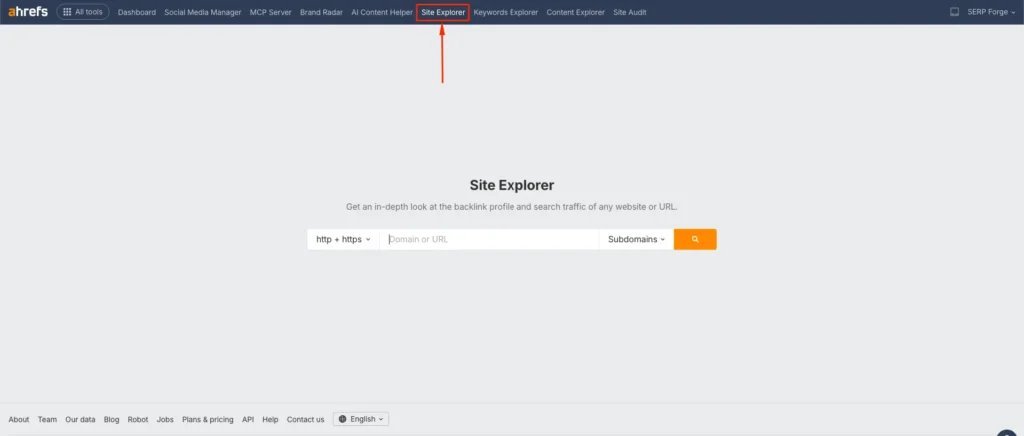
1. Go to the Site Explorer
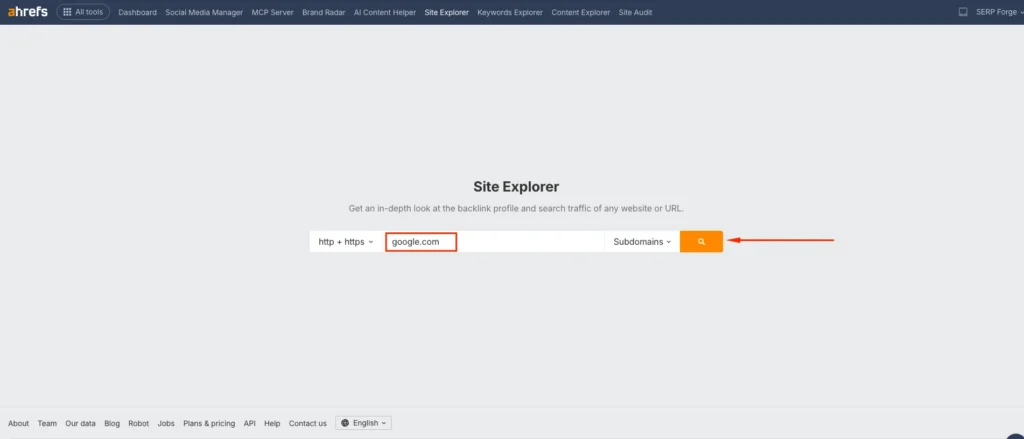
Log in to your Ahrefs account and open the Site Explorer section. This is where you can run a detailed analysis of any domain.
2. Enter Your Website and Click Search
Type your website’s URL into the search bar and click the search icon. Ahrefs will crawl your domain and load the complete backlink overview.
3. Open the Broken Backlinks Report
In the left-hand menu, find the Backlinks section and click Broken Backlinks. This report displays external links that point to pages on your site that return 404 or other error codes.
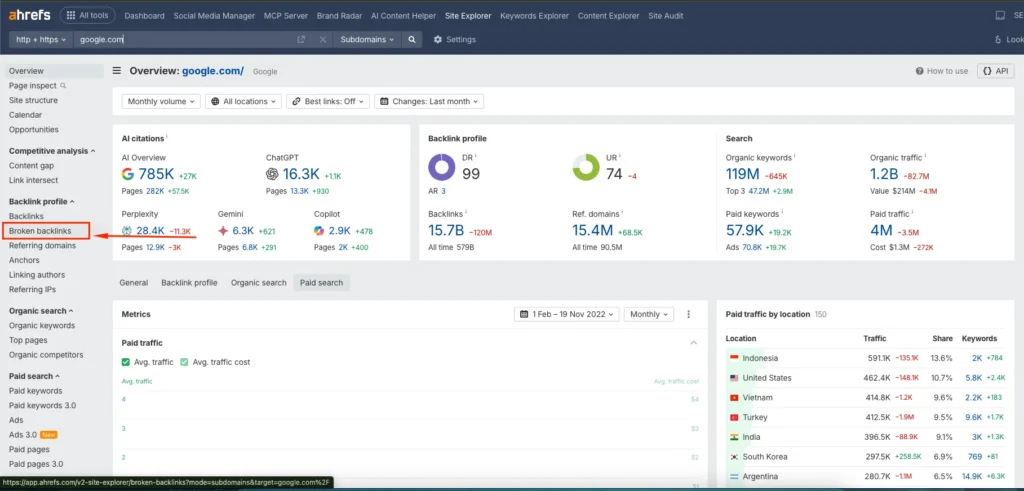
These links still exist on other websites but land on a page that no longer works.
4. Apply Filters (Optional but Useful)
Ahrefs allows you to filter the broken backlinks so you can focus on the most important ones.
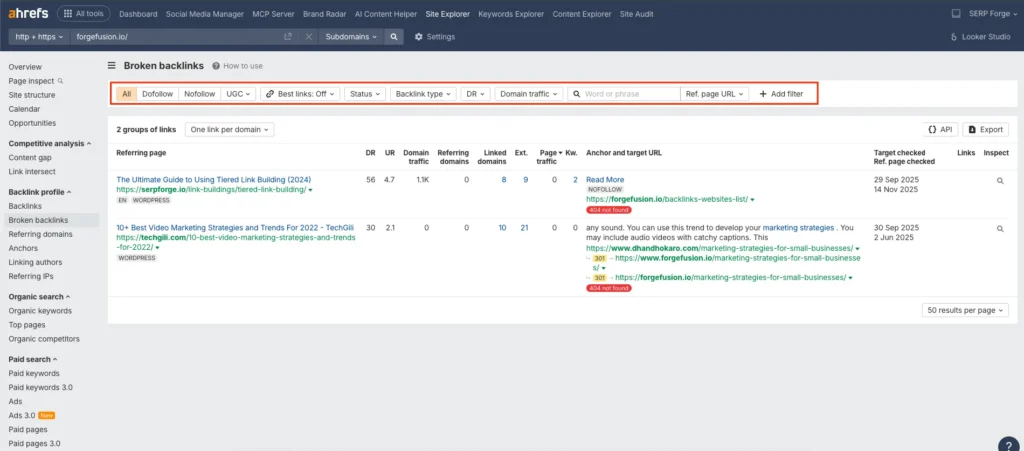
Here is a quick overview of the main filters and what they do:
- All: Shows every broken backlink pointing to your site.
- Dofollow: Displays only dofollow links that pass authority. These links should be your top priority.
- Nofollow: Shows nofollow backlinks. They do not pass authority but can still be relevant for traffic or brand visibility.
- UGC: Filters links marked as user-generated content, such as forum posts or comments.
- Best links: Off: When enabled, it shows the most authoritative links first.
- Status: Filter backlinks by HTTP status codes like 404 or 410.
- Backlink type: Shows whether the link is text, image, or redirect.
- DR: Filters referring domains by Domain Rating so you can prioritize high-authority sources.
- Domain traffic: Shows websites that send actual traffic.
- Ref. page URL: Lets you search for specific pages linking to you.
- Add filter: Lets you combine filters for a very targeted view.
These filters help you analyze your most valuable broken backlinks first, which is usually how I approach it for my own sites.
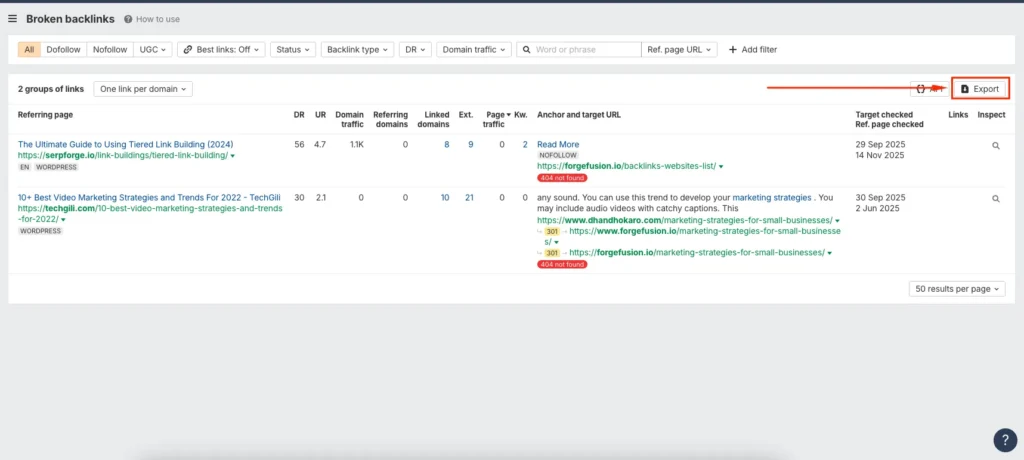
5. Export the Report
Click Export to download the complete list of broken backlinks. Once you have the file, you can organize and analyze it to build a clear strategy for fixing link losses.
How to Fix Broken Backlinks
Finding broken backlinks is only the first step. The real SEO gains come from fixing them. Here are the most practical ways I use to restore link equity.
1. Redirect the Broken URL to a Relevant Page
If the deleted page has a close alternative or an updated version, set up a 301 redirect. This sends users and link equity to the right destination. It is the most effective fix in most cases.
2. Recreate the Missing Content
If the broken page had strong backlinks and high relevance, consider restoring that page. I often recreate old articles or product pages when their links are too valuable to lose.
3. Contact the Linking Site and Request an Update
If a redirect is not suitable, reach out to the website linking to you. Share the correct link and request a quick update. Many site owners are willing to fix links when you provide the right URL.
4. Update Internal Redirect Chains
Sometimes the broken backlinks come from internal pages. Make sure your internal links point to working and updated URLs. This improves crawlability and user experience.
5. Fix Issues After Website Redesign or Migration
Most broken backlinks appear after switching themes, CMS platforms, or URL structures. Review your exported list and redirect or rebuild pages that lost their URLs during the migration.
Conclusion
Now you know exactly how to find broken links using Ahrefs and turn lost SEO value into new opportunities.
The Broken Backlinks report helps you identify deleted pages, assess link equity, and fix issues before they impact your rankings.
A consistent broken link audit keeps your website healthy and ensures that every backlink continues to support your SEO growth.
Frequently Asked Questions
How often should I check for broken backlinks in Ahrefs?
I check at least once every month, especially after publishing new content, updating pages, or making technical changes to the site.
Do broken backlinks hurt my rankings?
Yes. When a backlink points to a deleted page, the link equity does not reach your site, and this affects your overall authority.
Can I find broken internal links in Ahrefs?
Yes. Ahrefs has a Site Audit tool that detects internal broken links inside your own website.
Is it better to redirect or recreate missing pages?
Redirecting works best when you have a closely related page. Recreating is better if the deleted page had high authority or specific relevance.
Does Ahrefs show historical backlink losses?
Yes. You can use the Lost Backlinks section to see when and how backlinks were lost over time.