



To build custom SEO reports using Ahrefs Report Builder, create personalized reports by combining the SEO metrics and visualizations that matter most to your goals.
Ahrefs Report Builder lets you include keyword rankings, organic traffic, backlink data, site audit insights, and competitor performance in one dashboard, making it easier to track results and share SEO progress with stakeholders.
In this blog, I’ll walk you through how to build custom SEO reports using Ahrefs Report Builder, based on how I personally use it for regular SEO reporting.
By the end, you’ll know exactly how to create, customize, and download professional SEO reports that are easy to understand and actionable.
Steps to Build SEO Reports Using Ahrefs Report Builder
1. Start by Clicking on All Tools
After logging into your Ahrefs account, head to the main dashboard and click on All tools. This section lists every tool Ahrefs offers, including Site Explorer, Site Audit, Rank Tracker, and Report Builder.

I usually start here because it gives a clear overview and avoids jumping between sections.
2. Click on Report Builder
From the All tools menu, select Report Builder. This is the tool specifically designed for creating visual, shareable SEO reports.
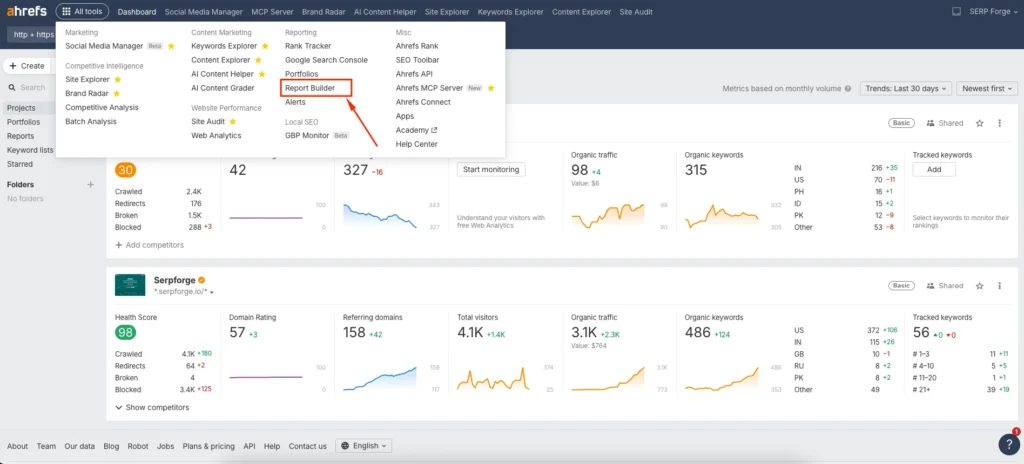
Once inside, you’ll see any previously created reports or an option to create a new one.
3. Start by Creating a New Report
Click on the create button from the left navigation and then choose report. This opens a blank reporting canvas where you can build your report from scratch.
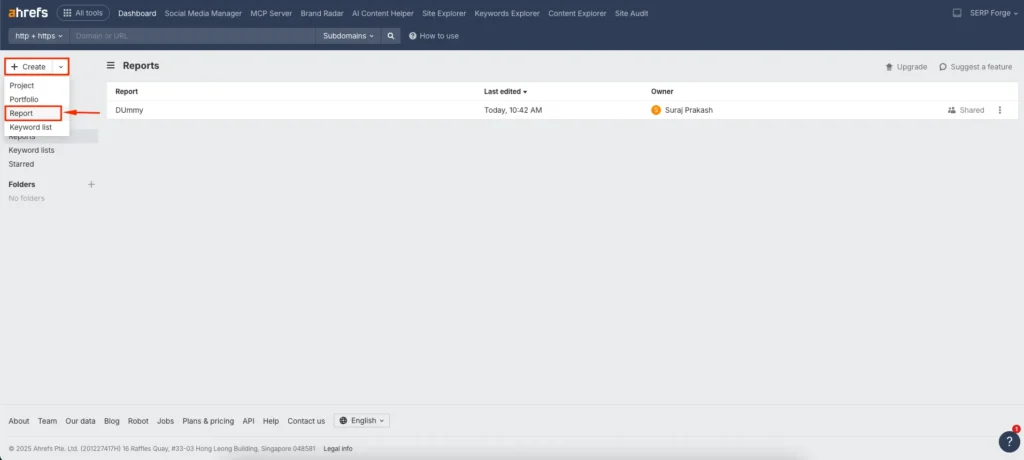
I prefer starting fresh rather than using templates because it allows better control over what data actually matters for the project.
4. Give a Name to the Report
Assign a clear and descriptive name to your report. For example, you can name it based on the website, reporting period, or focus area like “Monthly SEO Performance Report.”
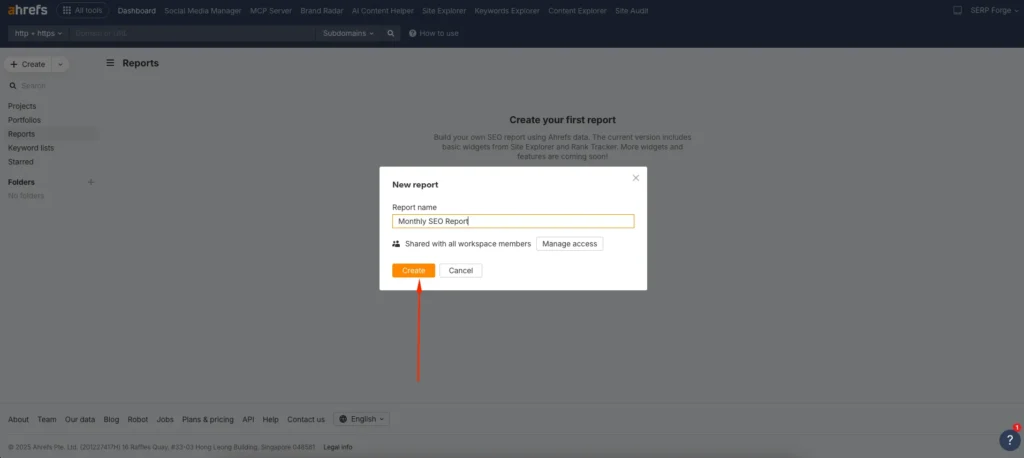
A clear name helps when managing multiple reports across different projects.
5. Click on Add Widgets
Once the report is created, click on Add widgets. Widgets are the building blocks of your report.
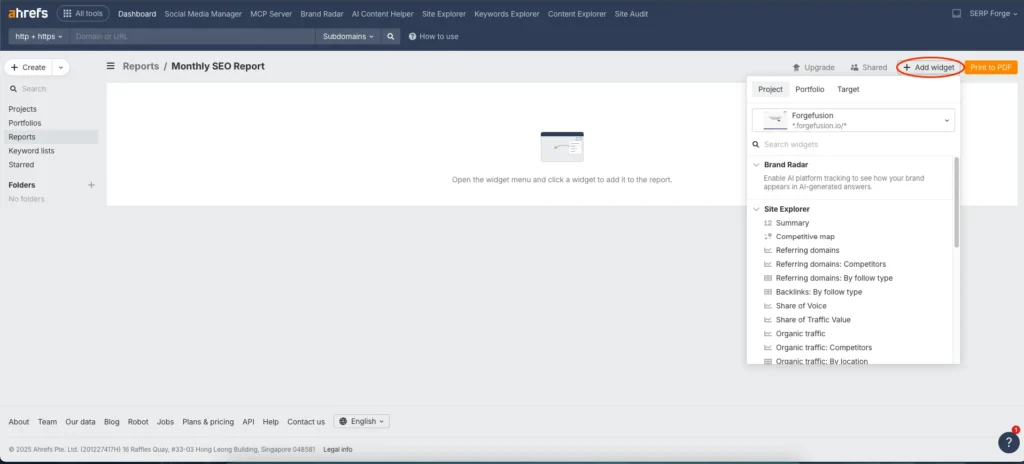
Each widget represents a specific SEO metric or dataset, such as backlinks, organic traffic, or keyword rankings.
6. Choose the Project or Target URL
Before adding data, select the project or target URL you want the report to pull data from.
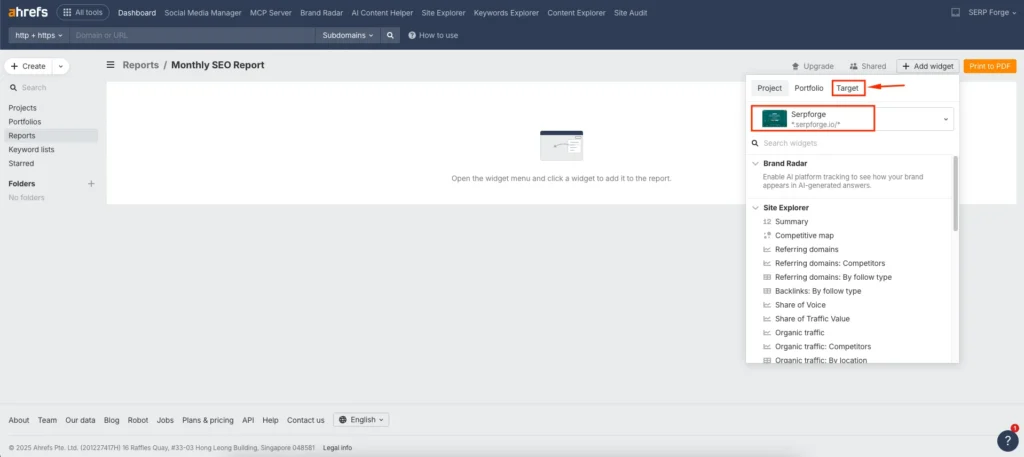
You can choose a verified project, a specific domain, subdomain, or even a single page. This flexibility is useful when reporting on page-level SEO performance or individual campaigns.
7. Choose the Widgets Based on Your Requirement
Now select the widgets that align with your reporting goals. Based on my experience, it’s best to include only meaningful metrics rather than every available option.
Common widgets available in Ahrefs Report Builder include:
- Organic traffic overview
- Organic keywords performance
- Keyword position changes
- Backlink profile summary
- Referring domains growth
- New and lost backlinks
- Top pages by traffic
- Site health overview from Site Audit
- Competitor comparison metrics

You can rearrange widgets, resize them, and organize the report so it flows logically from traffic and visibility to links and technical health.
8. Download the Report as a PDF
Once your report is complete, click on Download PDF. Ahrefs generates a clean, professional PDF that can be shared with clients, team members, or stakeholders.
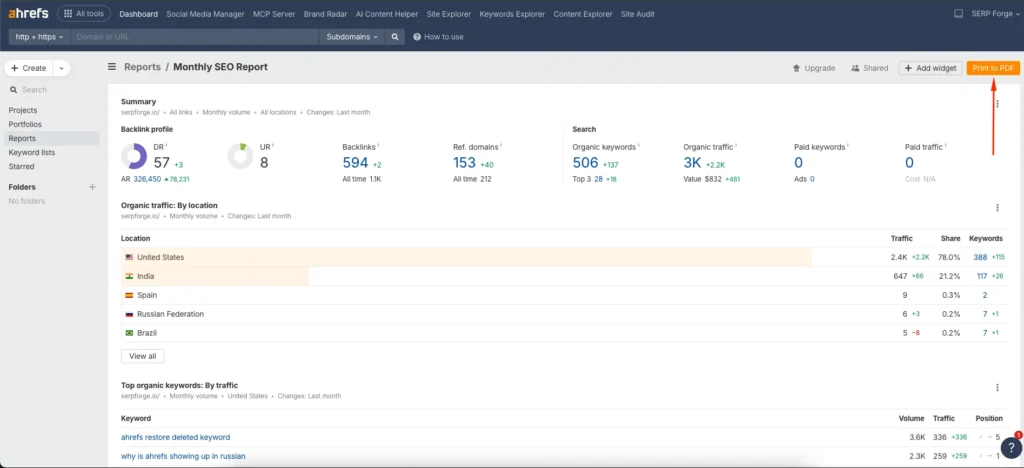
I often review the PDF once before sharing to ensure the data tells a clear story.
Conclusion
Building custom SEO reports in Ahrefs saves time and improves how SEO performance is communicated.
Instead of exporting scattered data, Report Builder allows you to present only the metrics that matter, structured in a clear and professional format.
When you create a custom report using Ahrefs report building, you gain better control over SEO insights, improve transparency, and make decision-making easier for both technical and non-technical audiences.
With a bit of practice, this becomes one of the most efficient ways to handle SEO reporting.
Frequently Asked Questions
Can I schedule reports automatically in Ahrefs Report Builder?
Yes, Ahrefs allows you to schedule reports so they are generated and sent automatically at set intervals.
Can I create different reports for different stakeholders?
Yes, you can build multiple reports tailored to clients, management, or internal SEO teams using different widgets.
Does Ahrefs Report Builder support page-level reporting?
Yes, you can create reports for specific URLs, not just entire domains or projects.
Are the reports customizable after creation?
Yes, you can edit widgets, change layouts, and update data sources at any time.
Is Ahrefs Report Builder suitable for beginners?
Yes, the interface is user-friendly, and even beginners can create useful SEO reports with minimal setup.