




Not every backlink helps your website. While high-quality links can strengthen your search visibility, spammy or manipulative backlinks may create unnecessary risks, especially if they come from link schemes, hacked websites, or negative SEO attacks.
For example, imagine a cybersecurity company launches a new product and gains media coverage from 50 legitimate websites.
A few weeks later, its backlink profile suddenly shows 8,000 new links from hacked websites, foreign-language spam pages, and auto-generated subdomains.
Since contacting thousands of website owners is unrealistic, the company can create a disavow file and ask Google to disregard those links.
While useful in specific situations, the tool should be used cautiously because disavowing legitimate backlinks can remove valuable ranking signals and referral value.
How Does the Disavow Tool Work?
The Disavow Tool works by allowing you to upload a text file containing URLs or domains that you want Google to ignore during its link evaluation process.
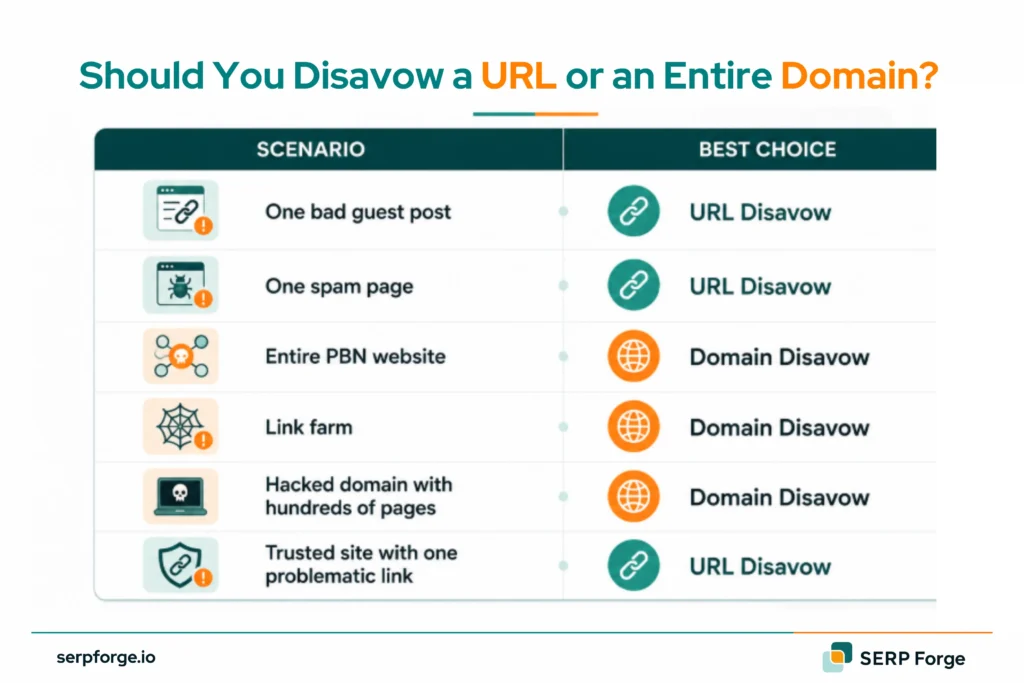
URL-Level Disavow
A URL-level disavow tells Google to ignore a specific page linking to your website.
Example:
This option is useful when only a few pages on an otherwise legitimate website contain problematic links.
A technology blog publishes a guest post that includes a manipulative anchor text link to your website. Instead of disavowing the entire domain, you may choose to disavow only that specific URL.
Domain-Level Disavow
A domain-level disavow instructs Google to ignore all links coming from an entire website.
Example:
domain:spamdomain.com
This is commonly used when a website exists solely for spam, link manipulation, or automated content generation.
You discover 500 backlinks from a private blog network (PBN) built purely for link selling. Rather than listing every URL individually, you can disavow the entire domain.
How Google Processes Disavowed Links
Submitting a disavow file does not remove backlinks from the internet.
Instead:
- Google stores your request
- Google re-crawls the listed pages
- The specified links are gradually discounted
Processing can take several weeks or even months, depending on crawl frequency.
Impact on Search Rankings
Disavowing links does not automatically increase rankings.
Instead, it helps remove potentially harmful link signals. Improvements usually occur when:
- A manual penalty is revoked
- Toxic link influence is reduced
- Google’s algorithms reassess your backlink profile
When Should You Use the Disavow Tool?
Google specifically recommends using the tool only when you believe harmful backlinks may affect your website.
Manual Actions for Unnatural Links
If Google issues a manual action for unnatural links, backlink cleanup and disavowal are often required.
Example:
A website receives a notification in Google Search Console stating that artificial links are pointing to the site. After attempting link removals, the remaining links can be disavowed as part of the recovery process.
Negative SEO Attacks
Negative SEO occurs when competitors or malicious actors create large volumes of spam backlinks targeting your website.
Common signs include:
- Thousands of irrelevant backlinks appearing suddenly
- Foreign-language spam sites
- Adult, gambling, or pharmaceutical links
Toxic Backlink Profiles
A backlink profile dominated by low-quality websites can create trust issues.
Examples include:
- Automated directory networks
- Article spinning websites
- Link farms
- Expired domain networks
Link Schemes and Spam Networks
If your website previously participated in paid link schemes or manipulative link-building campaigns, disavowing those links may be necessary.
When Should You Not Use the Disavow Tool?
Many websites use the tool unnecessarily.
Google Already Ignores Links
Google has become significantly better at identifying and ignoring spammy links automatically.
Not every suspicious backlink requires disavowal.
Low-Quality but Natural Backlinks
Not every weak backlink is harmful.
For example:
- Small blogs mentioning your brand
- Forum discussions
- New websites linking naturally
These links may provide context and diversity to your backlink profile.
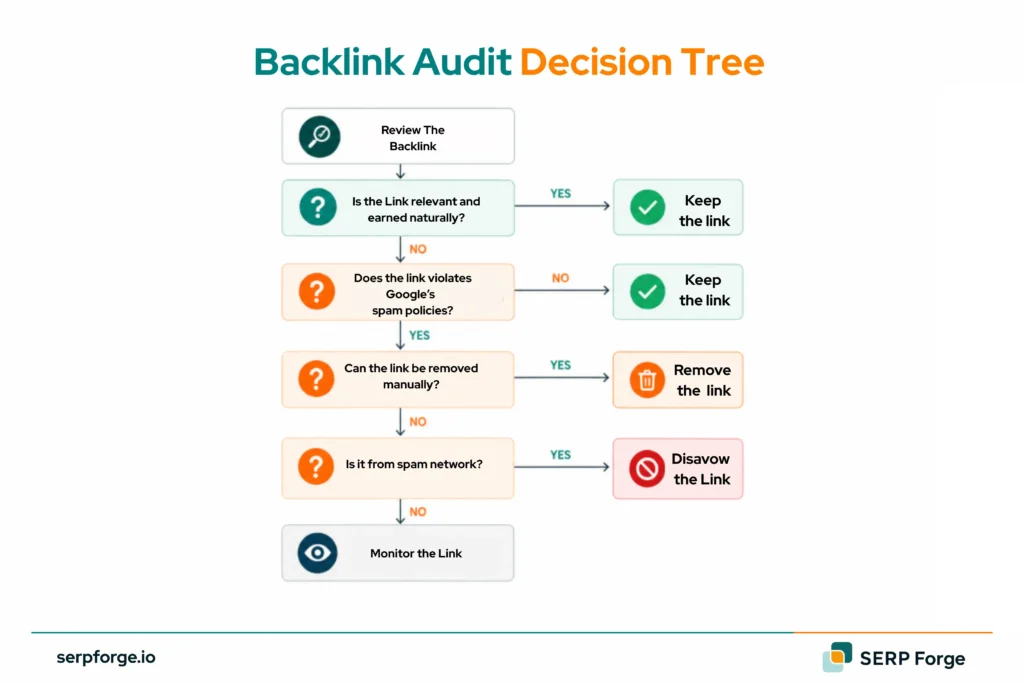
Disavowing Without a Backlink Audit
Never upload a disavow file without reviewing your backlinks first.
A proper audit helps identify:
- Genuine toxic links
- Natural links
- Valuable authority links
Risks of Incorrect Link Disavowal
One incorrect disavow file can remove years of earned link equity.
Many websites accidentally disavow:
- Media mentions
- Industry directories
- Partner websites
- Relevant guest posts
How to Create a Disavow File
A disavow file is a plain text (.txt) file containing the URLs or domains you want Google to ignore.
Disavow File Requirements
Google requires:
- UTF-8 or 7-bit ASCII encoding
- One entry per line
- Plain text format
- Comments beginning with #
Example:
# Links identified during backlink audit
domain:spamdomain.com
URL-Level Disavow Examples
Domain-Level Disavow Examples
domain:spamdomain.com
domain:linkfarm.net
domain:toxicdirectory.org
Common Disavow File Errors
Common mistakes include:
- Uploading Excel files instead of TXT files
- Using incorrect formatting
- Including spaces before URLs
- Disavowing valuable domains
- Forgetting the “domain:” prefix
How to Submit a Disavow File to Google
Once your disavow file is ready, submit it through Google’s Disavow Tool using the process below:
- Accessing the Disavow Tool: Visit Google’s Disavow Tool and select the property you want to manage.
- Uploading the File: Choose your prepared TXT file and upload it. Google will immediately validate the file format.
- Replacing an Existing File: Uploading a new file replaces the previous version entirely. Always keep a backup copy before making changes.
- Confirming Successful Submission: After submission, Google will display a confirmation message. Remember that link processing is not instant and may take several weeks.
What Are the Benefits of Using the Disavow Tool?
Disavowing toxic backlinks can reduce link-related risks and help maintain a healthier backlink profile:
Recovering from Link-Based Penalties
The primary benefit is assisting recovery from manual actions caused by unnatural links.
Improving Backlink Profile Quality
Removing harmful link signals helps create a cleaner backlink profile.
Reducing the Impact of Spam Links
Disavowal can help protect websites experiencing:
- Negative SEO campaigns
- Automated spam attacks
- Large-scale toxic link acquisition
Practical Scenario:
An eCommerce website discovers 20,000 spam backlinks from hacked websites. Disavowing those domains reduces the risk of Google associating the site with manipulative link practices.
What Are the Risks of Using the Disavow Tool?
While the Disavow Tool can be effective in certain situations, incorrect use may negatively affect your website’s backlink profile and search performance:
Losing Valuable Link Equity
The biggest risk is accidentally removing legitimate backlinks that contribute to rankings.
Ranking Fluctuations
Google may need time to reassess your backlink profile, which can cause temporary ranking changes.
Processing Delays
Results are rarely immediate.
Depending on crawl frequency, changes may take weeks or months to be fully reflected.
Overuse and Misuse of the Tool
Many website owners treat the Disavow Tool as a routine SEO task. In reality, it should be used only when a genuine backlink problem exists.
Think of it as a surgical tool, not a maintenance tool.
Conclusion
The Disavow Tool is Google’s mechanism for helping website owners manage harmful backlinks that cannot be removed manually. It can be valuable when dealing with manual penalties, toxic link networks, or negative SEO attacks, but it should be used cautiously.
Before submitting any disavow file, conduct a thorough backlink audit, evaluate each link carefully, and focus on genuine risks rather than every low-quality backlink. In most cases, Google already ignores a large portion of spam links automatically. The best use of the Disavow Tool is targeted, evidence-based backlink cleanup rather than routine link management.