



When I first started working on large-scale SEO projects, one of the biggest challenges I faced was analyzing multiple URLs at once without spending hours checking them individually.
That is when I learned how to use Batch Analysis in Ahrefs, and it immediately became one of the features I relied on the most.
Batch Analysis helps you evaluate hundreds of URLs in a single click and gives you essential metrics like Domain Rating, URL Rating, organic keywords, backlinks, and traffic estimates. It saves time and provides a clear view of how strong a group of URLs or different competitors are.
In this blog, I will explain what this feature does, the benefits you get from it, and a step-by-step process to use it the right way. I will also share how I personally use Batch Analysis for competitor research, link building, and evaluating content opportunities.
Steps to Use Batch Analysis using Ahrefs
1. Look for “All Tools” to check all menu options
Start by logging into your Ahrefs account and clicking on the “All Tools” option at the top left corner next to the Ahrefs logo.
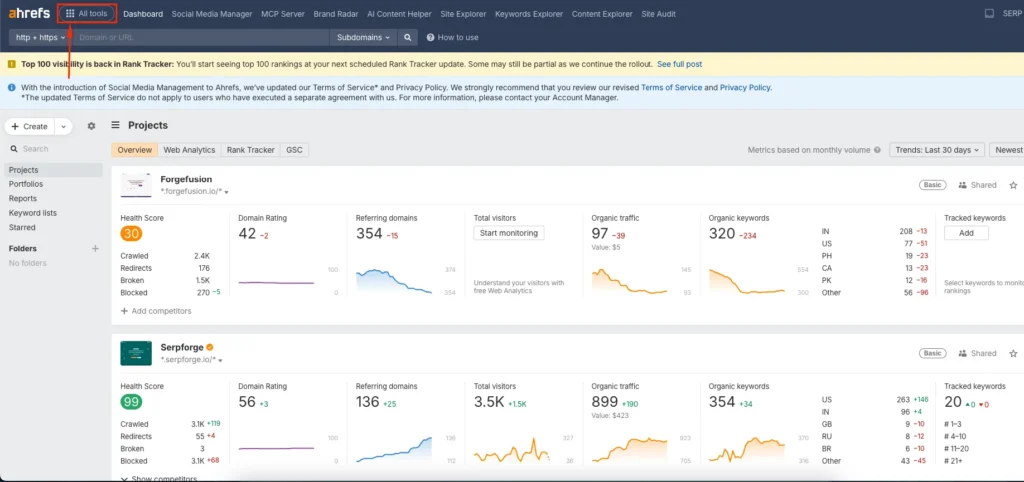
Note: Earlier, Ahrefs had a “More” button to expand the menu before accessing Batch Analysis. They removed that and updated the interface, so now you can access it directly.
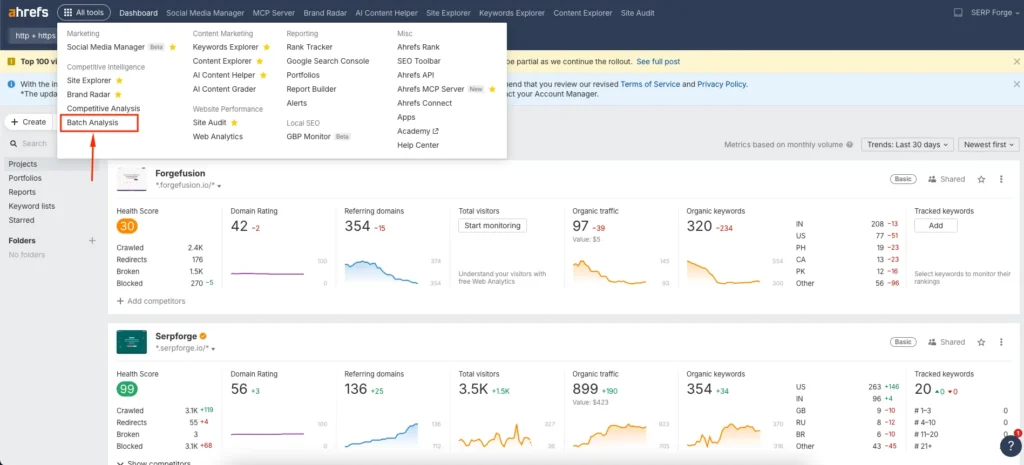
2. Click on the “Batch Analysis” Option
From the tools list, click on “Batch Analysis.” You will find it in the first column.
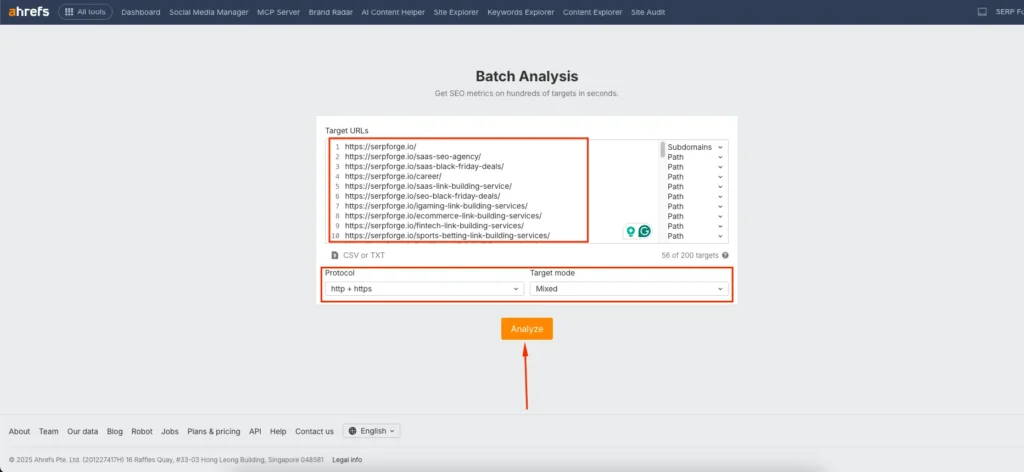
3. Enter the List of URLs and Click the Analyze Button
Paste the list of URLs you want to analyze. You can add up to 200 URLs at once.
Choose the target mode, such as exact URL, path, subdomain, or domain. You can set it individually for each URL or apply it to all URLs at once.
After selecting the preferred mode, click the Analyze button.
Once the analysis is complete, Ahrefs shows metrics such as:
- AR (Ahrefs Rank)
- DR (Domain Rating)
- URL Rating
- Organic keywords
- Organic traffic
- Referring domains
- Backlink IPs
- And several additional SEO indicators
4. Download by clicking on “Export”
When the results appear, click the Export button at the top right corner. Choose CSV or Google Sheet format and download the file for detailed review.

Use Cases of Bulk Analysis in Ahrefs
As an SEO professional, I use the Bulk Analysis feature almost every week. It helps me evaluate large sets of URLs quickly without manually checking metrics one by one.
For example, when I want to study a competitor, I collect their top URLs and run them through Batch Analysis to understand their strongest content, link profile, and ranking patterns.
SEO backlink research helps identify competitor links and high-value opportunities.
I also use it to analyze multiple competitor domains at once. This gives me a clear idea of which websites in my niche have the highest authority and which ones are potential sources for outreach or content inspiration.
When working on link building, I run a list of prospect URLs through Batch Analysis to check their DR, organic visibility, and overall trust level before sending outreach emails.
It is one of the fastest ways to validate opportunities, compare domain strength, audit large content sets, and build a data-backed SEO strategy.
Conclusion
Learning how to use Batch Analysis in Ahrefs makes it easier to analyze multiple URLs, compare competitors, and identify opportunities that would take much longer to find manually.
Whether you are auditing your own content, researching new niches, or qualifying backlink prospects, Batch Analysis gives you accurate metrics in seconds.
Consistently using this feature will help you make better decisions and create a more efficient SEO workflow.
FAQs on Bulk Analysis in Ahrefs
Can I analyze more than 200 URLs in Ahrefs Batch Analysis?
No. Ahrefs allows up to 200 URLs per batch, but you can run multiple batches if needed.
Does Batch Analysis work for both HTTP and HTTPS URLs?
Yes. You can enter any valid URL, including HTTP, HTTPS, and even URL parameters.
Can I compare domains and URLs together in the same batch?
You can mix them, but it is better to separate them to keep your analysis clean and more accurate.
Does the target mode affect the results?
Yes. Choosing an exact URL, path, subdomain, or domain changes the type of data Ahrefs collects, so always select the mode based on what you want to evaluate.
Can I use Batch Analysis for link-building research?
Yes. Many SEOs use it to quickly evaluate the authority and quality of potential backlink sources before outreach.