


Finding the top traffic-generating pages of your own website or a competitor’s site is one of the most practical SEO tasks you can do. I use this approach regularly when auditing websites and planning content strategies because it clearly shows which pages attract the most organic traffic and why they perform well.
When you analyze high-performing pages, you start to understand what type of content works best, which keywords drive traffic, and how search intent is being satisfied. If you study competitor pages that already rank well, you get a clear direction for building your own SEO content strategy instead of guessing what might work.
In this guide, I will walk you through how to find top traffic-generating organic pages using Ahrefs. These are the exact steps I personally use, and you can follow them whether you are analyzing your own website or researching competitors.
Steps to Find Top Pages in Ahrefs
1. Navigate to Site Explorer
After logging into your Ahrefs account, go to the top navigation bar and click on Site Explorer.
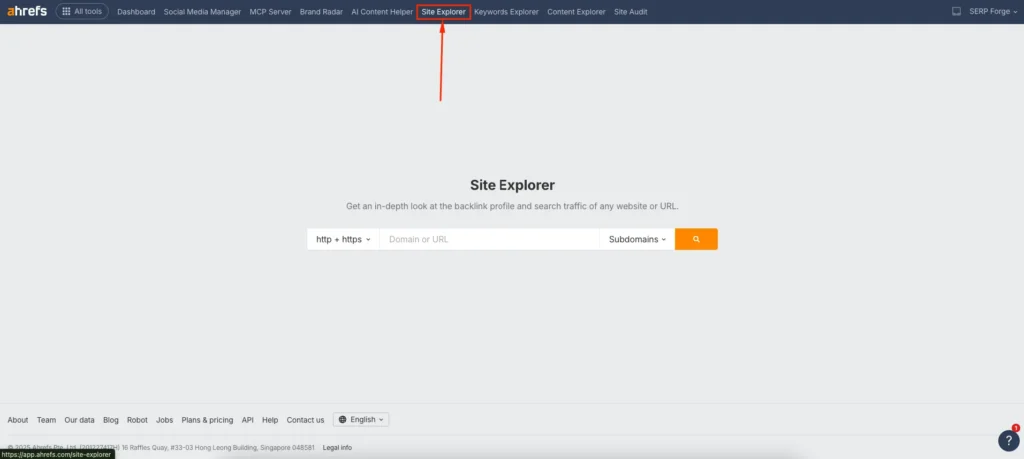
This is the main tool I rely on for competitor research and organic traffic analysis because it provides detailed insights into search performance at both domain and page level.
2. Enter Your Website or Competitor Domain
In the search bar, enter your own website URL or a competitor’s domain. I usually start with a competitor that ranks well in my niche so I can identify proven content ideas.
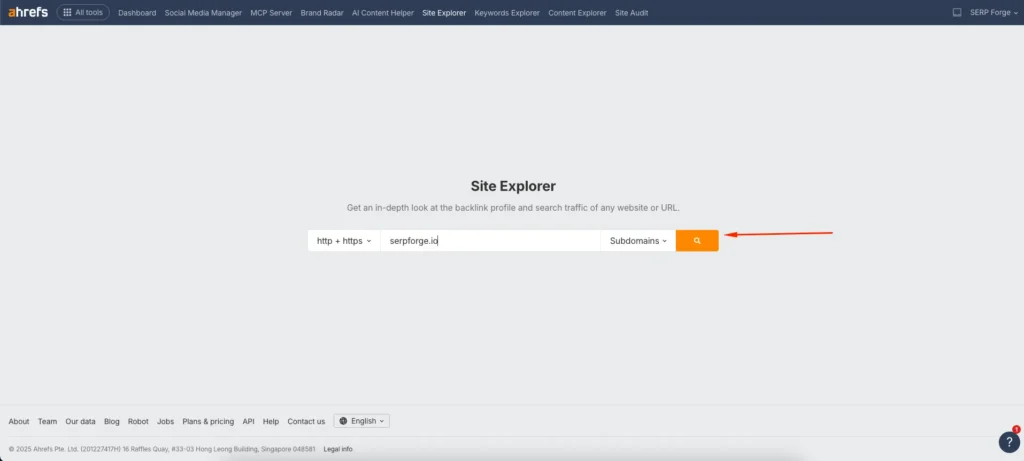
Make sure you choose the correct mode, such as domain or subdomain, depending on what you want to analyze.
Once you run the search, Ahrefs will load an overview showing organic traffic, keyword rankings, backlinks, and other SEO metrics.
3. Navigate to the Top Pages Section
From the left-hand vertical menu, scroll down to the Organic Search section and click on Top Pages. This section is where Ahrefs lists all pages that receive organic traffic from search engines.
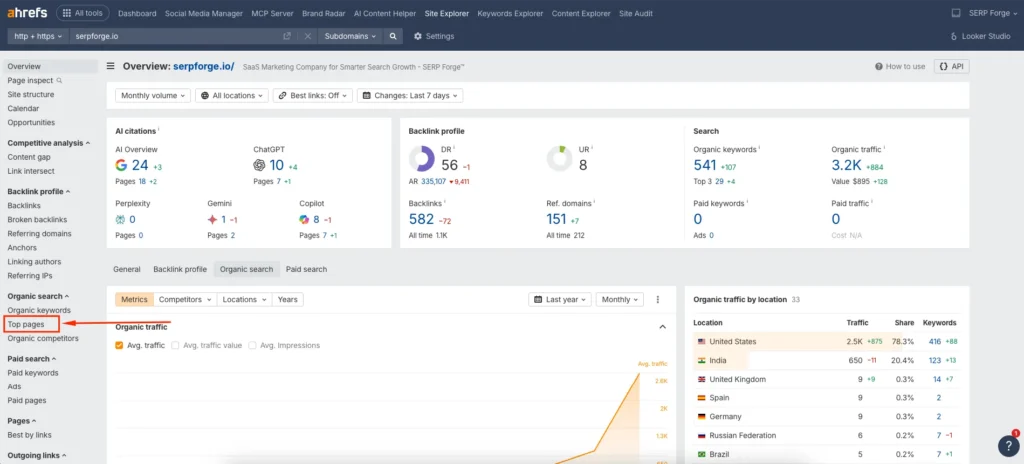
I use this report to quickly identify which pages drive the highest estimated traffic and which keywords are responsible for that visibility.
4. Apply Relevant Filters
To make the data more useful, apply filters based on your goal. You can filter by country to see traffic from a specific location, sort pages by traffic value, or exclude branded keywords if you want to focus on informational content.
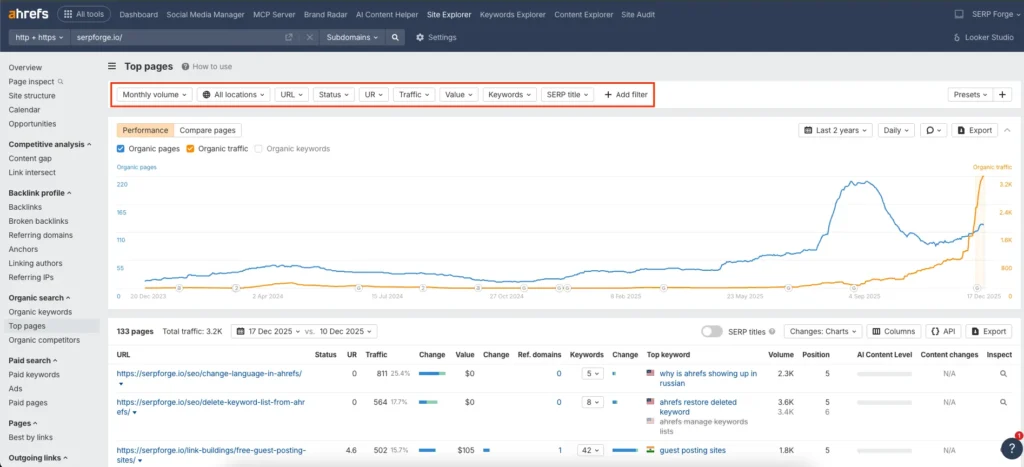
Filtering helps you avoid distractions and focus only on pages that match your SEO objectives. This step is especially useful when analyzing large websites with hundreds or thousands of indexed pages.
5. Download the Report
Once you find the pages you want to analyze further, use the export option to download the report. I often download this data to compare competitors, group similar pages, and map content gaps for future articles.

Having the data offline makes it easier to plan content updates, keyword targeting, and internal linking strategies.
Conclusion
Using Ahrefs to analyze top traffic-generating pages is a simple yet powerful way to understand what works in organic search, and by following these steps, you can quickly identify high-performing pages, analyze their keywords, and use those insights to improve your own SEO strategy.
When you consistently find top traffic generating pages in Ahrefs, you stop relying on assumptions and start building content based on real search data, which leads to more focused topics, better rankings, and sustainable organic traffic growth.
Frequently Asked Questions
Can I find top traffic-generating pages without an Ahrefs subscription?
No, Ahrefs requires a paid subscription to access detailed organic traffic and top pages data. Limited insights may be visible through free tools, but they are not as accurate or comprehensive.
How accurate is Ahrefs traffic data for top pages?
Ahrefs provides estimated organic traffic based on keyword rankings and search volume. While it is not exact, it is reliable for comparison and SEO decision-making.
Should I analyze my own website or competitors first?
I recommend starting with competitors to understand what already performs well, then analyze your own site to find improvement opportunities and content gaps.
Can I use Ahrefs top pages data for content updates?
Yes, this data is very useful for refreshing old content, improving internal links, and expanding pages that already receive some organic traffic.
How often should I check top traffic-generating pages in Ahrefs?
For active SEO projects, checking once a month works well. This frequency helps you track performance changes and spot new ranking opportunities early.

