




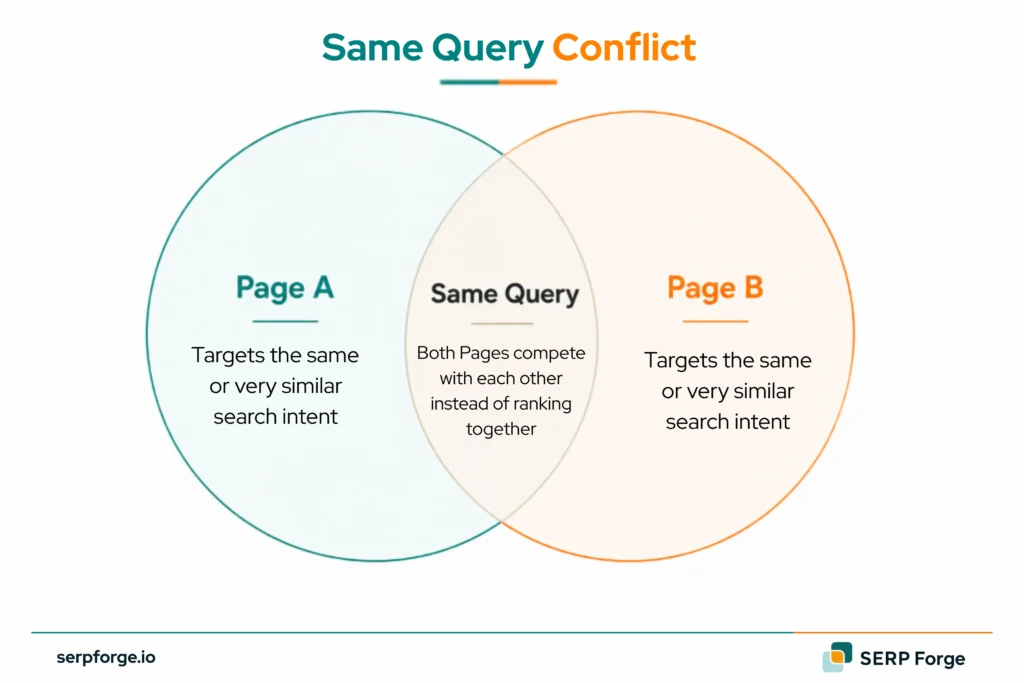
Have you ever noticed two pages on your website competing for the same search query? Instead of improving your rankings, this can split clicks, backlinks, and ranking signals across multiple URLs.
This issue is known as keyword cannibalization. It occurs when multiple pages target the same keyword and satisfy the same search intent, making it difficult for search engines to identify the best page to rank. As a result, rankings can fluctuate, page authority may weaken, and your SEO performance can suffer.
For keyword cannibalization in SEO, the main question is intent. Do the pages serve different search intent, or are they near-duplicate answers for the same query?
What Causes Keyword Cannibalization?
Keyword cannibalization usually starts when a site keeps publishing pages around the same topic without a keyword map.
This often creates overlapping content, unclear intent mapping and content overlap across several URLs.
A blog may publish several guides on the same question. An ecommerce site may create overlapping category pages. A SaaS site may publish a glossary page, blog post and landing page around the same term.
Common causes include:
- Similar blog posts targeting the same keyword
- Product or category pages with overlapping intent
- Old content never merged after updates
- Multiple landing pages for the same offer
- Unclear internal linking to the preferred page
- Content briefs that ignore existing pages
- Tags or archives ranking for target keywords
The issue grows when each page has its own links, impressions, anchors and internal links. Google then has to choose between several URLs that look eligible for the same query.
Prevention starts with keyword mapping before a new page is approved. Each important keyword should have one primary page, with supporting pages built around related subtopics.
How Does Keyword Cannibalization Hurt Your SEO?
Keyword cannibalization hurts SEO in four main ways:
Diluted Page Authority
When several pages target the same keyword, backlinks and internal links can spread across lower-value URLs.
This creates page authority dilution because links, anchors and internal signals are divided between competing pages.
One page may have links, another may have better content and another may have more internal links. Google gets no clear preferred URL for the query.
Unstable Rankings
Keyword cannibalization can cause ranking swings.
Google may rank one URL this week and another URL next week. This URL switching can create SERP volatility, even when impressions look stable in Google Search Console.
This is common when two pages have similar titles, intent and content depth.
Wasted Crawl Budget
Large sites can waste crawl budget through overlapping pages.
Googlebot may crawl several similar URLs when one consolidated URL could have served the same intent. This is more common on ecommerce, news, programmatic SEO and large blog sites.
For small sites, this is usually a content clarity issue before it becomes a crawl budget issue.
Lower Click-Through Rates
Cannibalization can weaken click-through rate when the wrong page appears for the query.
If an outdated page ranks instead of the preferred page, users may see an outdated title tag, weaker meta description or older content. That can reduce clicks even when impressions stay steady.
Ranking position is only one part of the issue. The wrong page may be appearing for the right query.
How Do You Find Keyword Cannibalization on Your Site?
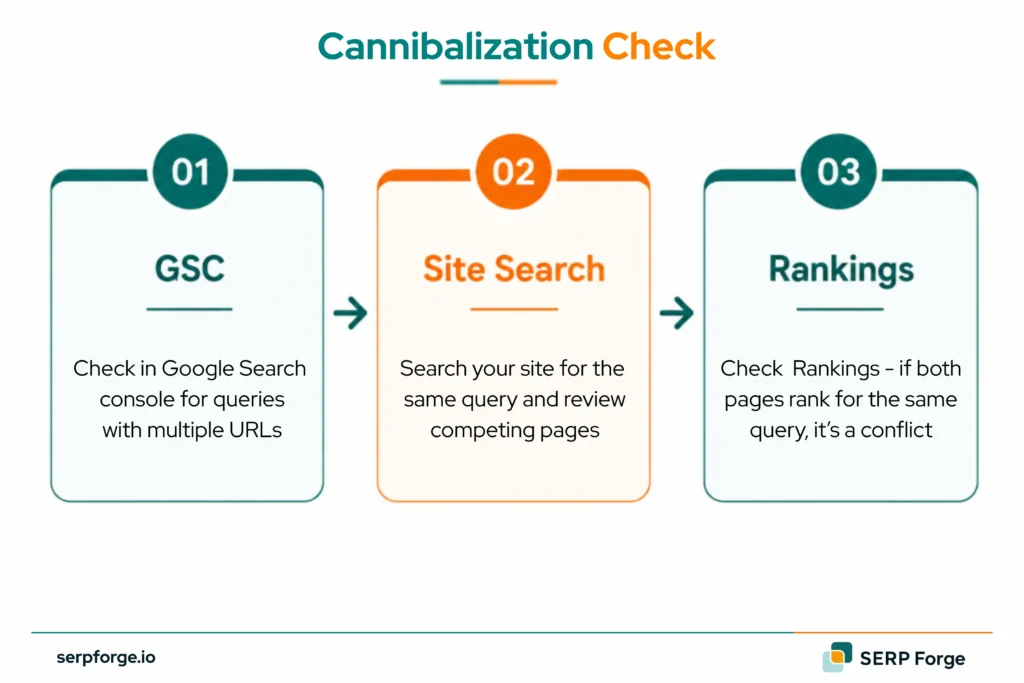
You can find keyword cannibalization by checking whether multiple URLs appear for the same query and the same search intent.
Start with these checks to confirm URL overlap before changing content:
Use Google Search Console
Google Search Console is the best free starting point.
Open Performance, then Search results, then Queries. Search for the target keyword and click the Pages tab.
Check whether more than one URL gets impressions or clicks for the same query.
This helps confirm query cannibalization before you merge, redirect or re-optimise any page.
Look for these patterns:
- Two similar pages getting impressions
- Ranking position switching between URLs
- One lower-value page getting clicks meant for the preferred page
- A target keyword split across several URLs
A single query across multiple pages is not enough proof. Open the pages and check whether they serve the same intent.
Run a Site Search Operator in Google
Use a site search to find possible overlap.
Search this query in Google:
site:yourdomain.com “target keyword”
This shows pages Google associates with that keyword.
Review the results manually. Check titles, headings, URLs and content angle.
If several pages answer the same query in the same way, you may have a cannibalization issue.
This method finds possible overlap, then Google Search Console confirms whether those URLs get impressions for the same query.
Check Rankings in Ahrefs or Semrush
Ahrefs or Semrush can show when multiple URLs rank for the same keyword.
Use this check when the site has many pages.
Look for:
- Multiple URLs ranking for one query
- Similar pages ranking outside top positions
- URLs swapping positions over time
- Keywords where the wrong page ranks
This helps separate harmless overlap from ranking conflict.
If two URLs rank for the same keyword but serve different intent, you may leave them alone. If both compete for the same intent and neither performs well, fix the overlap.
How Do You Fix Keyword Cannibalization?
The right fix depends on page value, search intent, clicks, impressions, backlinks and conversions:
Merge the Competing Pages
Merge pages when both have useful content and serve the same intent.
This is content consolidation. Useful sections move into one primary page and the old URL supports it through a 301 redirect.
Choose the best-performing URL as the main page. Usually, this is the page with better rankings, backlinks, internal links or conversions.
Then move useful sections from the lower-value page into the main page.
After merging:
- Update the main page
- Remove repeated sections
- Add missing examples
- Redirect the lower-value URL
- Update internal links
This creates one focused page instead of several competing pages.
Delete and Redirect the Lower-Value Page
Delete and redirect a page when it is thin, outdated or no longer useful.
This is content pruning. Use it when the page has no unique search intent or business value.
Use a 301 redirect from the lower-value page to the preferred page.
Before deleting, check:
- Organic traffic
- Backlinks
- Conversions
- Internal links
- Search intent
If the page has valuable backlinks, redirecting helps preserve some authority.
Set a Canonical Tag
Use a canonical tag when similar pages must stay live.
This is common for ecommerce pages, filtered URLs or near-duplicate pages that users still need.
A canonical tag tells Google which URL should be treated as the main version.
Use canonicals when:
- Similar product pages must exist
- URL parameters create duplicate versions
- Printable or tracking pages duplicate content
- You need one preferred ranking URL
A canonical tag works only when internal links and sitemap entries also point to the preferred URL.
Re-optimise for a Different Keyword
Re-optimise a page when it has a separate purpose but overlaps with another page.
Use this when both pages have separate search demand.
For example, a site may have:
- “SEO audit checklist”
- “technical SEO audit”
- “enterprise SEO audit”
These pages may overlap, but each can target a different search intent.
To re-optimise, update the title tag, H1, intro, subheadings, internal links, examples and meta description.
The goal is to give each page a distinct job.
Set to Noindex as a Last Resort
Use noindex only when a page should stay on the site but should not appear in search results.
This can work for campaign landing pages, internal resources or duplicate pages needed for users.
Use noindex only after checking traffic, backlinks and search demand. If the page has value, merging or redirecting is usually safer.
What Are Keyword Cannibalization Examples?
These keyword cannibalization examples show when overlap needs action and when it can stay:
Example 1. Blog Posts With the Same Intent
A SaaS blog has these pages:
- “How to choose CRM software”
- “Best way to choose a CRM”
- “CRM buying guide for small businesses”
All three target buyers comparing CRM tools. They repeat the same advice and compete for similar keywords.
Merge them into one complete CRM buying guide and redirect the lower-value posts.
Example 2. Ecommerce Category Overlap
An ecommerce site has these category pages:
- “Running shoes”
- “Best running shoes”
- “Running trainers”
If all three show similar products and target the same intent, Google may struggle to choose one.
Keep one main category page and re-optimise the others for distinct needs, such as trail running shoes or women’s running shoes.
Example 3. Harmless Overlap
A site has two pages ranking for “YouTube keyword research”:
- A blog guide explaining how to do YouTube keyword research
- A free YouTube keyword tool page
Both may rank for similar queries, but they serve different intent. One teaches, while the other provides a tool.
Leave both pages live and use internal links to connect them.
Conclusion
Keyword cannibalization is what happens when a content library has no traffic ownership. A blog update, a landing page and an old guide can all chase the same query without anyone noticing.
The fix is editorial discipline. Pick the page that should win, then turn nearby pages into supporting assets instead of quiet competitors.