


Tracking mobile rankings matters more than ever. Over the years, I have seen websites lose traffic even when desktop rankings looked solid, simply because mobile positions slipped.
With more than 60% of searches happening on mobile devices, ignoring mobile SERPs means missing a huge portion of potential organic traffic.
When I started focusing on mobile-first SEO, Ahrefs became my go-to tool for understanding exactly where my keywords rank on mobile compared to desktop.
In this guide, I will walk you through how I personally track mobile rankings in Ahrefs to make sure my keywords stay competitive across devices.
Steps to Track Mobile Ranking in Ahrefs
1. Navigate to Rank Tracker
First, log in to your Ahrefs account and click on All tools in the top navigation bar. From there, select Rank Tracker.

This is the section I use most often because it shows real-time keyword position data across devices, locations, and search engines.
2. Choose the Project
Once you are inside Rank Tracker, select the project you want to analyze. Each project contains the keywords you added to actively track.
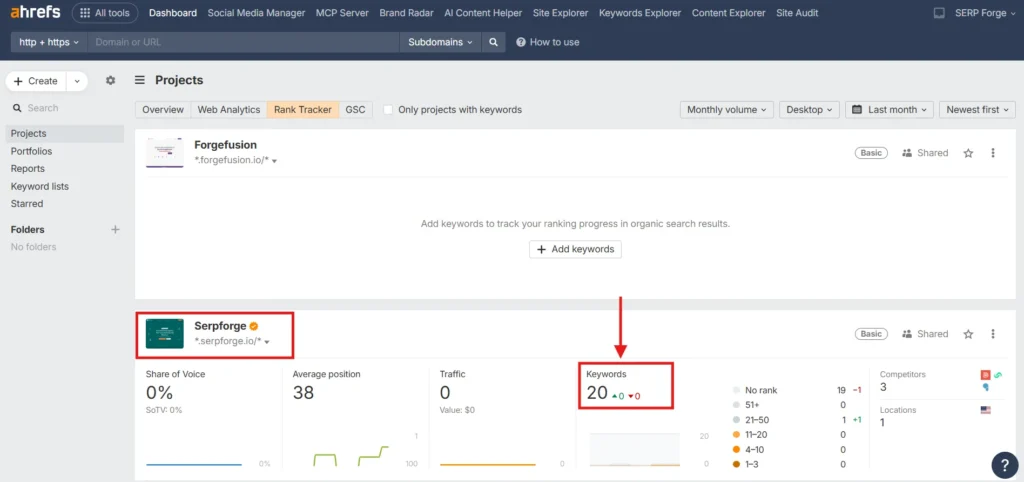
After clicking the project, you will land on the keyword overview where Ahrefs displays current rankings, position changes, and visibility metrics.
3. Switch from Desktop to Mobile Rankings
At the top of the ranking table, you will see a device filter set to Desktop by default. Change this filter to Mobile.
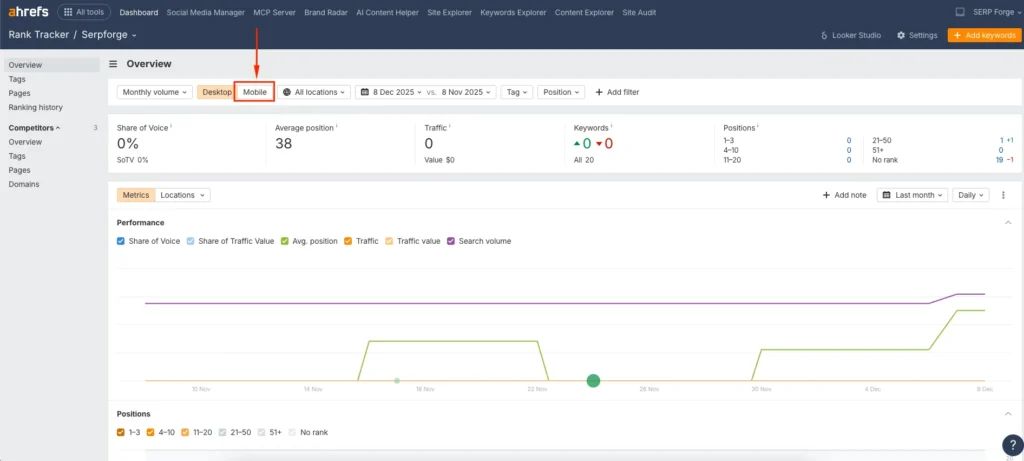
The moment you do this, Ahrefs updates the data to show mobile SERP positions only. This step helped me spot cases where a keyword ranked in the top three on desktop but dropped to page two on mobile.
4. Analyze Keyword Performance
Review how each keyword performs on mobile. I look at position changes, trends over time, and URLs ranking for each keyword.
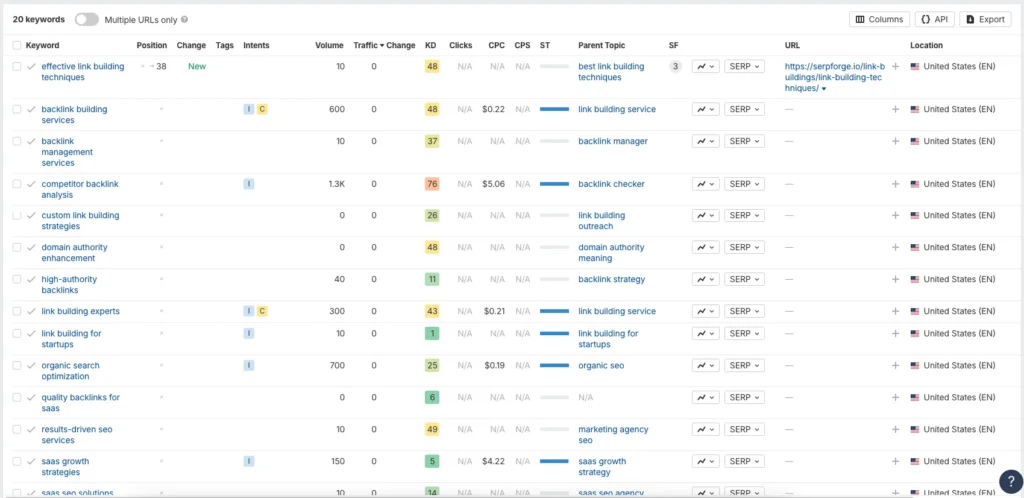
If a keyword drops on mobile, I usually check page speed, Core Web Vitals, and mobile usability issues, since these often affect mobile rankings more than desktop.
Conclusion
By logging into Ahrefs, navigating to Rank Tracker, selecting your project, switching the device filter from desktop to mobile, and reviewing keyword performance, you can accurately track and improve visibility through tracking mobile ranking in Ahrefs.
By following these steps, you can easily understand and improve your SEO performance through consistent tracking of mobile ranking in Ahrefs.
Frequently Asked Questions
Does Ahrefs track mobile rankings for all countries?
Yes, Ahrefs allows mobile rank tracking across multiple countries and search engines, depending on the project settings you choose.
How often does Ahrefs update mobile ranking data?
Ahrefs updates keyword rankings daily for most projects, which makes it reliable for monitoring mobile SEO fluctuations.
Can I compare mobile and desktop rankings in Ahrefs?
Yes, you can switch between mobile and desktop filters to compare performance and identify device-specific ranking gaps.
Is mobile rank tracking important for local SEO?
Absolutely. Mobile users often perform local searches, so tracking mobile rankings helps you understand visibility for location-based queries.
What factors commonly affect mobile rankings more than desktop?
Page speed, mobile-friendly design, responsive layout, and Core Web Vitals typically have a stronger impact on mobile rankings.

