


Monitoring brand mentions and keyword mentions has become essential for managing online visibility. Studies show that more than 65% of users trust organic brand references because they see them as unbiased signals of credibility.
I have personally used Ahrefs mention alerts for years to track new brand citations, link opportunities and online conversations related to my niche. It has helped me catch link prospects early, monitor competitors and respond to industry updates faster.
In this blog, you will learn what Ahrefs Mentions Alert is, how it works behind the scenes and how to set up new mentions alerts in Ahrefs with simple steps.
What is Ahrefs Mentions Alert?
Ahrefs Mentions Alert is a feature that notifies you whenever Ahrefs detects a new online mention of a keyword, brand name or phrase you want to track. These alerts help you stay aware of who is talking about your business, niche or competitors.
Ahrefs uses a combination of large-scale web crawling and real-time content indexing to detect new mentions. Its crawler scans millions of pages daily and stores text content in its database.
When the system finds text that matches your saved query, it triggers an alert. This process allows Ahrefs to identify new brand mentions, contextual keyword usage and trending topics across blogs, news sites and other publicly available web pages.
I rely on this system because it consistently catches new mentions faster than most manual monitoring tools.
How to Set Up New Ahrefs Mentions Alerts
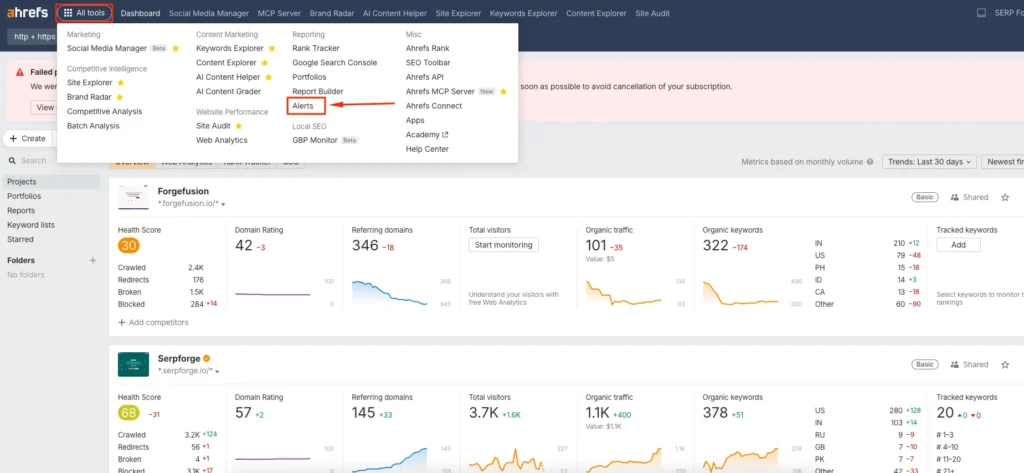
1. Look for the Alerts option
Go to the All Tools section in your Ahrefs dashboard and select Alerts.
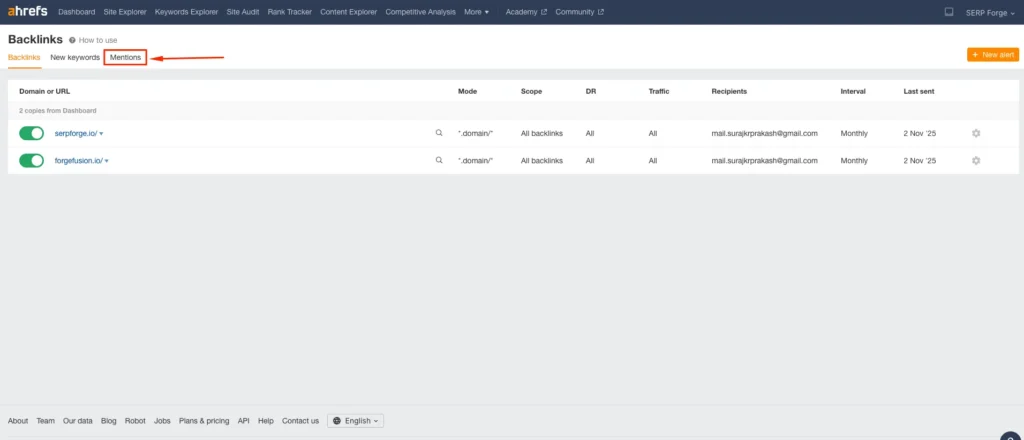
2. Navigate to “Mentions.”
Inside the Alerts dashboard, navigate to the Mentions section. It is located right after the “New Keywords” option.
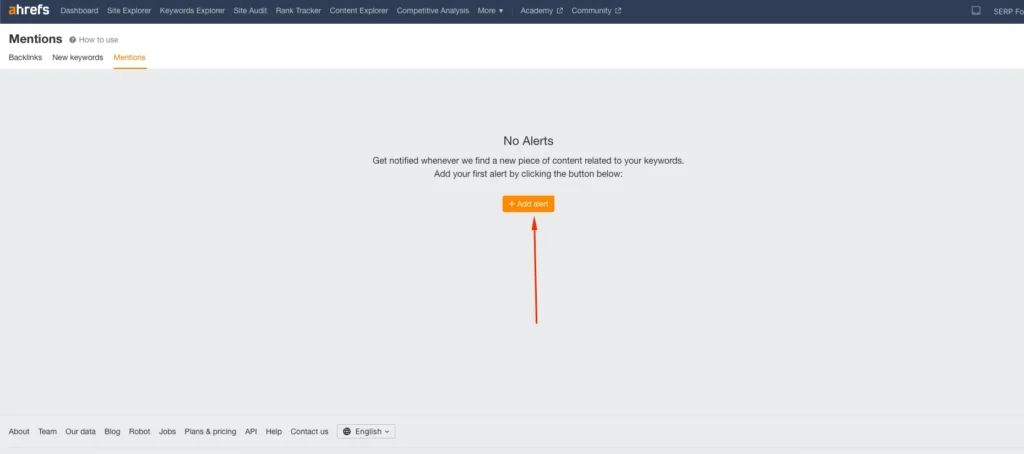
3. Add alerts
Click on Add filters to begin creating a new mention alert.
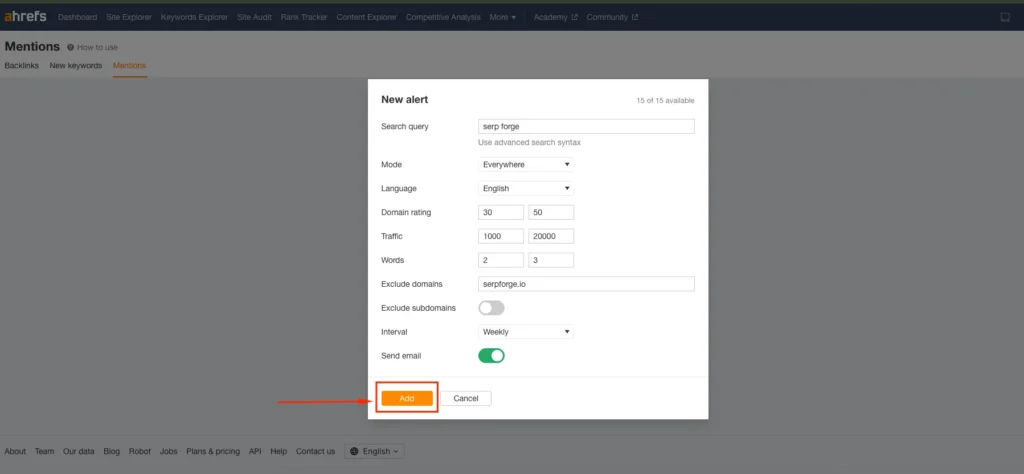
4. Set up alerts
Configure your alert by filling in the fields for Search query, Mode, Language, Domain Rating, Traffic, Words, Exclude domains and Interval. After selecting your preferred settings, click on the Add button to activate the alert.
Do you know?
Another recent data set says 81% of consumers need to trust a brand before they make a purchase.
Why We Use Ahrefs Mentions Alerts?
Ahrefs Mentions Alerts help you track brand awareness, discover new link-building opportunities and understand how your content or competitors appear across the web.
You can use these alerts to monitor industry trends, identify unlinked brand mentions, catch reputation issues early and stay updated on relevant discussions.
I find it especially useful for identifying both positive and negative mentions before they spread, which helps maintain a strong online presence.
Conclusion
You can now set up new mentions alerts in Ahrefs by opening Alerts, going to the Mentions section, adding a filter and configuring your query, mode, language, DR, traffic, words, domain exclusions and interval settings in a single streamlined process.
I use these alerts because they help me track brand mentions, find link opportunities and stay updated on important conversations without manual effort.
Once you start using them, you will see how useful they are for monitoring your online presence in a consistent way.
FAQs
Can Ahrefs Mentions Alert track competitors?
Yes, you can set alerts for competitor brand names and monitor where they are being mentioned across the web.
Do Ahrefs mention alerts include social media mentions?
Ahrefs primarily tracks publicly accessible web pages, which means it may not capture all social media content depending on platform restrictions.
How fast does Ahrefs send mention alerts?
Alert frequency depends on the interval you choose. Daily or weekly alerts are the most commonly used options.
Can I track long-tail keywords with mention alerts?
Yes, you can add long-tail phrases, product names or niche-specific queries to receive highly targeted alerts.
Does Ahrefs Mentions Alert help with link building?
Yes, you can use alerts to spot new unlinked brand mentions and reach out to authors for potential backlink opportunities.


