


Manually checking keyword rankings every few days sounds manageable until you handle multiple projects or track hundreds of keywords.
It quickly becomes inefficient and easy to miss important ranking changes. This is where automated email notifications in Ahrefs Rank Tracker make a real difference.
Automated alerts help you stay informed about keyword performance without logging into the tool every time. You get timely updates on ranking movements and newly discovered keywords, which allows you to react faster and make better SEO decisions.
In this blog, I will explain how to configure automated email notifications for Rank Tracker in Ahrefs, based on how I personally use it for ongoing SEO monitoring.
By the end, you will know how to set update frequencies, track new keywords, and receive ranking insights directly in your inbox.
Steps to Configure Automated Email Notifications for Rank Tracker in Ahrefs
1. Navigate to Rank Tracker from All Tools
After logging into your Ahrefs account, click on the All tools option in the top menu. From the list of tools, select Rank Tracker.
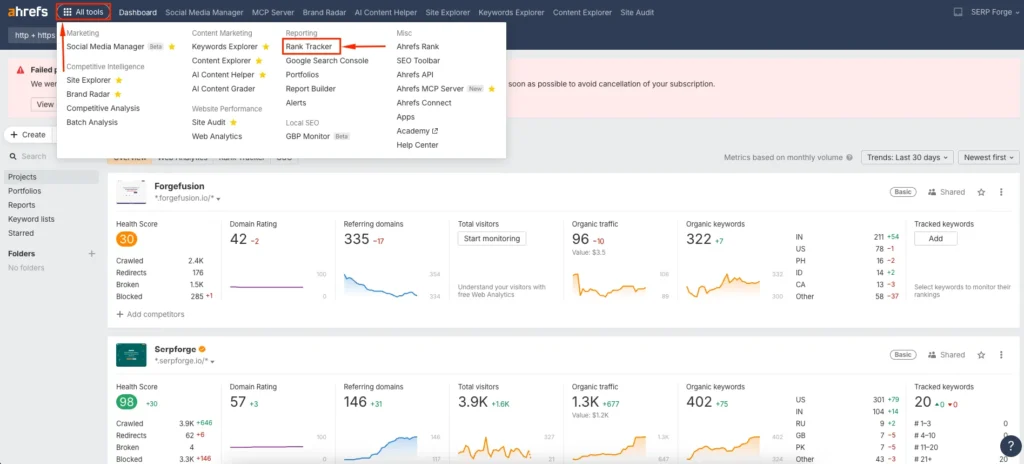
This section displays all your existing projects and their keyword tracking performance.
2. Open project settings using the three-dot menu
Locate the project for which you want to enable automated email notifications. On the right side of the project box, click on the three-dot menu.
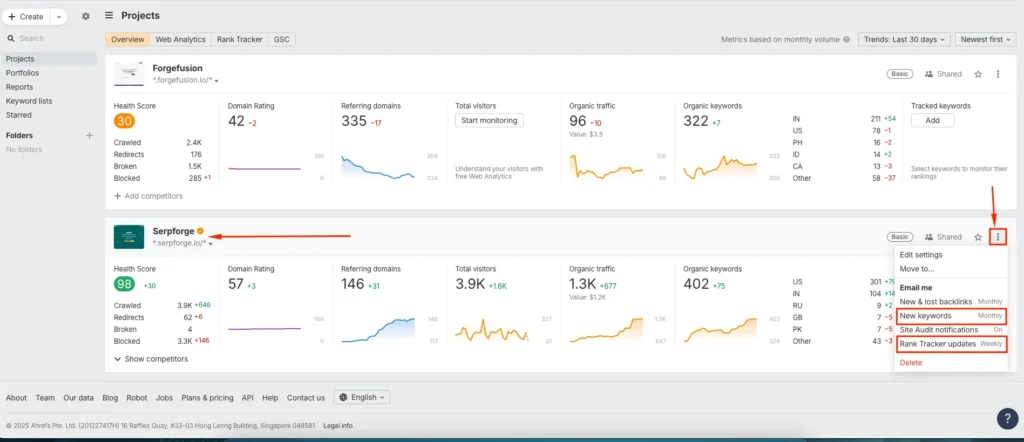
This menu contains settings related to Rank Tracker reports, keyword updates, and alert preferences.
3. Select the Rank Tracker update frequency
Under the Email me option, click on Rank Tracker updates. Here, you can choose how often Ahrefs sends ranking updates to your email.
You can select:
- Weekly
- Monthly
- Off
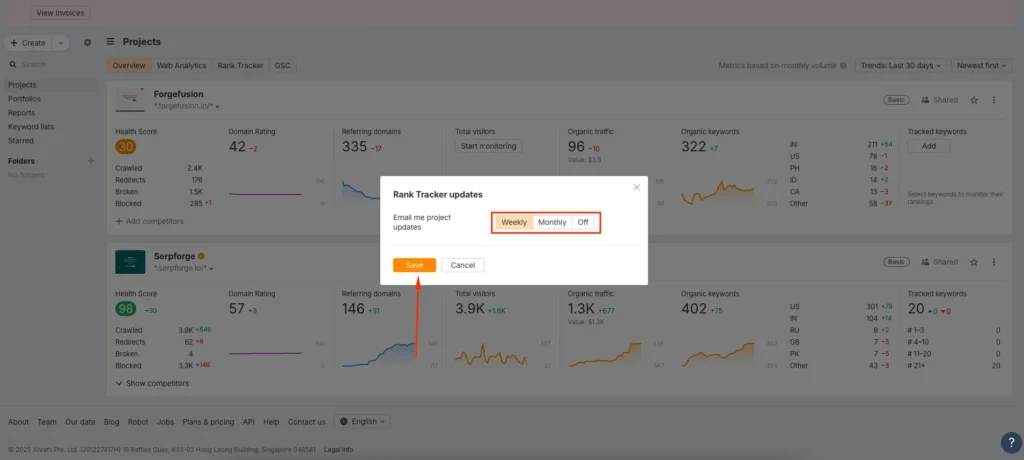
Choose the frequency that matches how closely you want to monitor keyword movements, then click Save.
I usually select weekly updates for active projects and monthly updates for long-term tracking.
4. Configure new keyword alerts and update intervals
Next, click on the three-dot menu again and select New keywords.
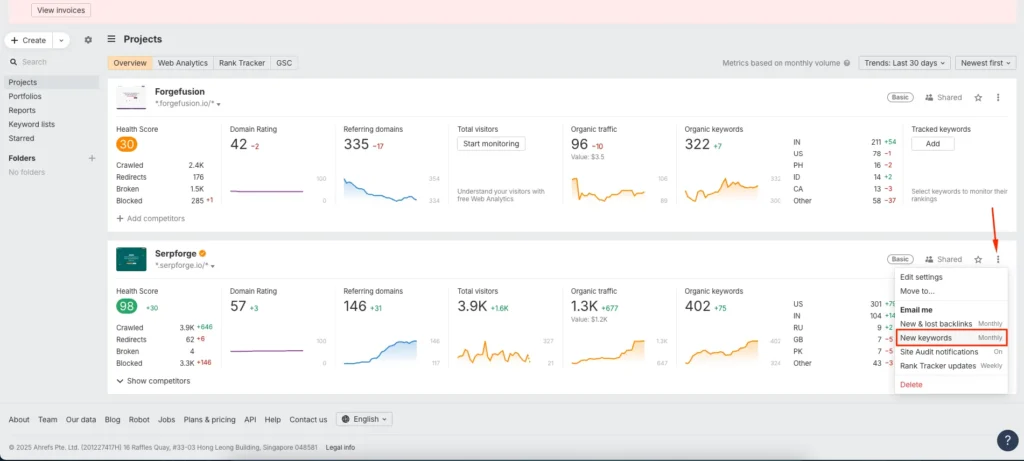
Here, you can define how Ahrefs alerts you when new keywords appear for your tracked pages. Select the keyword volume range, such as 100 to 500, choose the target country, and set the interval as daily, weekly, or monthly.
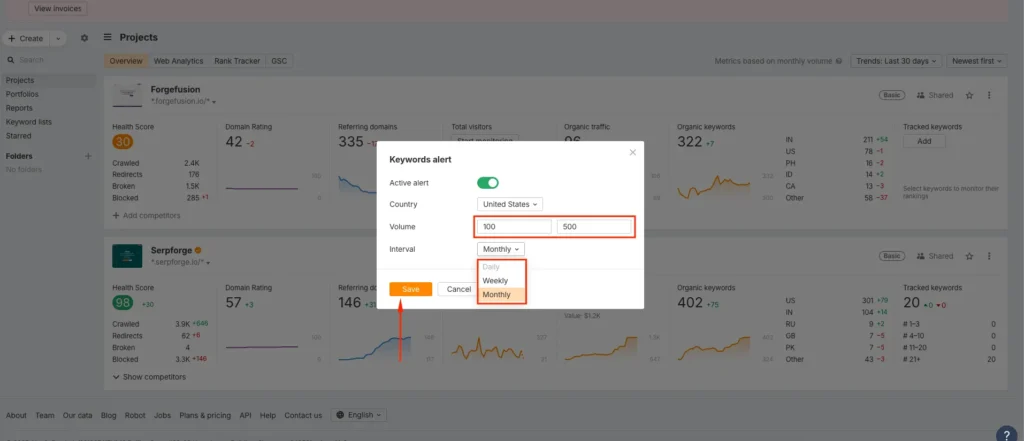
Once configured, click Save to apply the settings.
This feature is especially useful for detecting new ranking opportunities without running separate keyword research every time.
Conclusion
SEO tracking becomes far more effective when insights reach you automatically. When you configure automated email notifications for Rank Tracker in Ahrefs, you stay updated on ranking changes, keyword movements, and new opportunities without manual effort.
I have used this setup across multiple projects, and it consistently saves time while improving response speed to ranking drops or gains.
Whether you manage a single site or multiple clients, automated Rank Tracker alerts ensure you never miss important SEO signals and can act on data when it matters most.
Frequently Asked Questions
Can I receive Rank Tracker email notifications for multiple projects?
Yes, you can enable email notifications separately for each project inside Rank Tracker using the project settings menu.
Does Ahrefs send keyword position changes in email reports?
Yes, Rank Tracker email updates include changes in keyword positions based on the selected update frequency.
Can I turn off email notifications anytime?
Yes, you can disable notifications by selecting the Off option under Rank Tracker updates and saving the changes.
Is daily email notification available for Rank Tracker?
Rank Tracker ranking updates are typically available weekly or monthly, but new keyword alerts can be set to daily intervals.
Do automated emails affect Rank Tracker data accuracy?
No, email notifications only deliver existing Rank Tracker data. They do not impact tracking accuracy or keyword performance metrics.


